最適合團隊協作的舞台配置圖軟體推薦
閱讀約 25 分鐘 · 更新於 2026年8月7日 · 音響工程師、巡演經理、場地團隊、製作經理、樂團與音樂人
以協作功能為核心的頂尖舞台配置圖工具比較,我們針對非同步共同編輯、版本紀錄、唯讀分享、PDF 匯出等功能對 7 款工具進行評分,並找出真正能共同編輯技術需求清單的解決方案
Techrider.live — 所有個人功能永久免費,Rider 數量和匯出次數不限。僅 Collaboration 協作版收費,價格為 US$19.90/月。
重點摘要 — 多數舞台配置圖工具僅提供唯讀連結就號稱「協作」,這其實只是分享而非編輯。要實現真正的協作式舞台配置圖,關鍵在於你的音響工程師、巡演經理與樂團成員是否都能編輯同一份技術需求清單、查看修改紀錄,並同時產出可列印的 PDF 與線上連結。我們針對 7 款工具以三層級協作模型進行評分,如實區分目前已上線的功能與仍在開發路線圖上的功能。
Table of contents
A three-tier model for stage plot collaboration
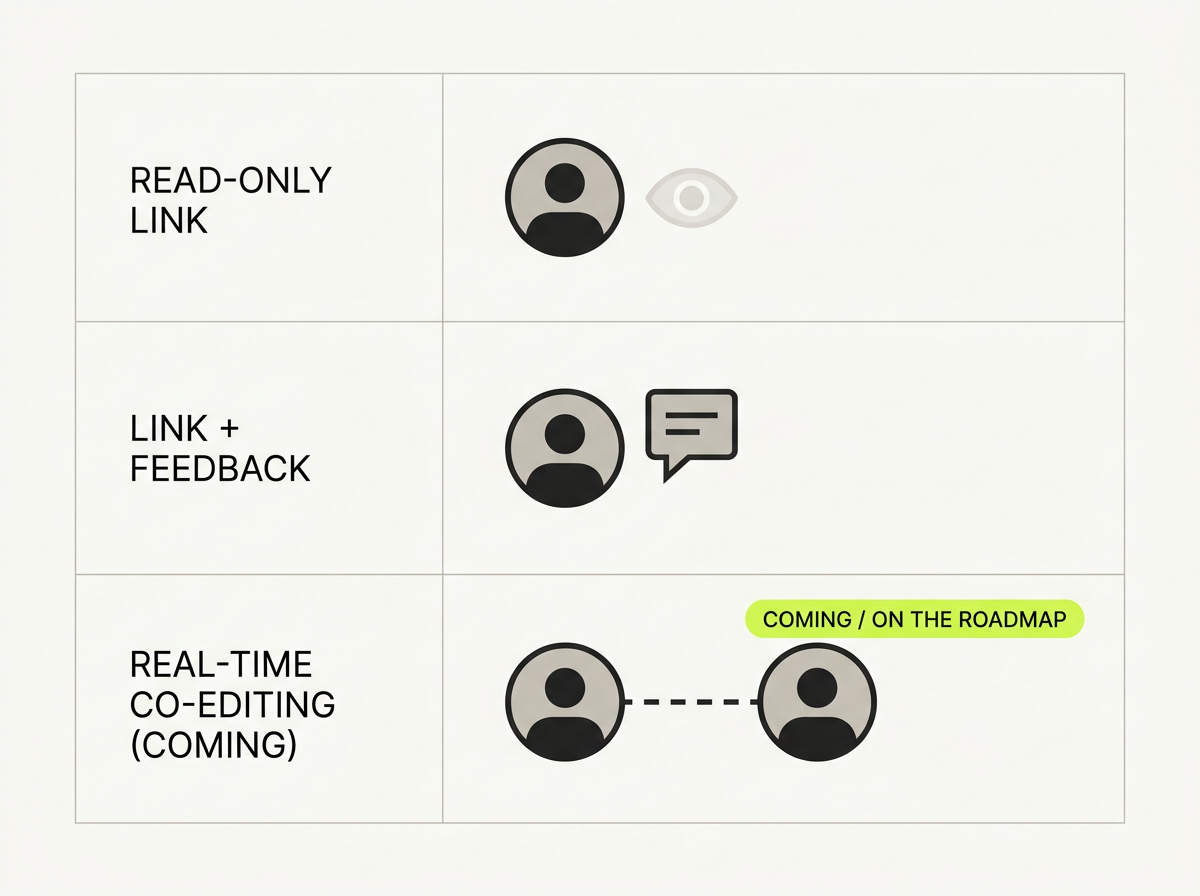
當樂團與製作團隊尋找團隊舞台配置圖工具時,通常指的是三種完全不同的需求。混淆這些需求,最終會得到號稱「協作」、實際上僅提供唯讀連結的工具——你的音響工程師甚至無法修正上面的打字錯誤。以下是本文採用的三層級模型:
- Tier 1 — Read-only link. One person owns the rider and sends out a URL. Recipients can view it (sometimes the latest version), but cannot change a channel name, move a wedge, or correct a backline note. This is sharing, not collaboration. → 第一層級:唯讀連結。由技術需求清單的擁有者發送網址,接收者僅能檢視內容(有時是最新版本),但無法修改通道名稱、移動楔形監聽喇叭位置,或修正樂器後線設備的備註。這屬於分享,而非協作。
- Tier 2 — Link + feedback. A step up: viewers can leave comments, requests, or redlines, but the owner still applies every edit by hand. Useful for advance, but the bottleneck is still one person. → 第二層級:連結+回饋。進階功能:檢視者可以留下評論、需求或修改標註,但所有編輯仍需由擁有者手動套用。適合用於前期溝通,但瓶頸仍然在於單一負責人。
- Tier 3 — True co-editing. Multiple people can open the same rider, edit, save, export, and see who changed what. This is where work actually gets unblocked — and it's the rarest tier in this category. → 第三層級:真正共同編輯。多人可開啟同一份技術需求清單,進行編輯、儲存、匯出,並查看所有修改紀錄。這是真正能打通工作流程的功能,也是此分類中最罕見的層級。
Most tools in this space live in Tier 1 or Tier 2. Only a couple reach Tier 3, and even then there's an honest distinction: asynchronous co-editing (one person saves, the next picks up) versus real-time simultaneous editing (two cursors at once, live presence). Both count as co-editing; they solve slightly different problems. → 此分類中的多數工具都停留在第一或第二層級,僅少數工具達到第三層級;即便達到第三層級,也有明確差異:非同步共同編輯(一人儲存後,下一人接手編輯)與即時同步編輯(兩人可同時游標編輯、顯示線上狀態)。兩者都屬於共同編輯,但解決的場景略有不同。
How we compared
本次為主題式比較——我們聚焦在協作功能,而非重複執行我們在 2026 最佳舞台配置圖軟體 主軸文章中使用的五項指標評分表。針對每款工具,我們提出 5 項協作相關問題:
- Collaboration capability tier — Tier 1 (read-only), Tier 2 (link + feedback), or Tier 3 (true co-editing)? → 協作功能層級 — 第一層級(唯讀)、第二層級(連結+回饋)或第三層級(真正共同編輯)?
- Async co-editing — Can more than one person edit the same rider, save, and hand off? → 非同步共同編輯 — 是否支援多人編輯同一份技術需求清單、儲存後交接給下一位編輯?
- Revision history — Can you see who changed what, and go back? → 版本紀錄 — 是否可查看誰修改了哪些內容,並還原至舊版本?
- View-only sharing — Is there still a clean read-only link for the venue? → 唯讀分享 — 是否提供可供場地人員使用的乾淨唯讀連結?
- PDF export — When collaboration is done, can you ship a festival-grade PDF? → PDF 匯出 — 協作完成後,是否可產出符合音樂節規格的 PDF 檔?
⚠️ 準確性說明:協作功能與付費限制經常變動,且廠商未必會明確公開所有資訊。若競爭對手的協作功能資訊不確定,或是我們從公開文件與社群討論推測而非來自官方確認的產品頁面,我們會特別標註。在將團隊標準化建立在某款工具上之前,請務必在各廠商官網確認最新功能。
Collaboration comparison matrix
| Tool | Collaboration tier | Async co-editing | Revision history | View-only sharing | PDF export |
|---|---|---|---|---|---|
| Techrider.live | Tier 3 — async co-editing today | ✅ 擁有者可邀請最多 3 位編輯者;編輯者可開啟、編輯、儲存、匯出檔案,並查看修改紀錄(即時協作與團隊工作區仍在開發路線圖上) | ✅ 可查看完整修改紀錄 | ✅ 提供線上唯讀連結,可選擇開啟回饋功能 | ✅ 產出符合音樂節規格的 PDF,與線上連結內容同步更新 |
| SoundDocs | Tier 3 — real-time | ✅ 支援即時協作(開源軟體) | 🔶 開源版本提供版本功能(請自行確認) | 🔶 (請自行確認) | 🔶 PDF 匯出功能尚不成熟 |
| StageOn | Tier 1 — read-only link | ❌ 僅提供唯讀線上連結 | ❌ 無 | ✅ 提供即時唯讀連結 | ✅ 可匯出 PDF 與線上連結 |
| Stage Plot Pro | Tier 1 — read-only link | ❌ 僅提供可分享的唯讀連結 | ❌ 無 | ✅ 提供可分享連結 | ✅ 可產出品牌化 PDF |
| Stage-Plan | Tier 1 — read-only link | ❌ 無 | ❌ 無 | 🔶 (請自行確認) | 🔶 免費/付費版本有匯出限制 |
| Ridermaker | Tier 1 — read-only link | ❌ 僅提供工具模式,無共同編輯功能 | ❌ 無 | 🔶 提供線上配置圖(請自行確認) | 🔶 提供線上配置圖與通道列表 |
| StagePlot Guru | None | ❌ 僅為 iOS/iPad 單機應用程式 | ❌ 無 | ❌ 無 | 🔶 匯出品質不佳(使用者回報) |
Two patterns jump out. First, only Techrider.live and SoundDocs reach Tier 3 — everyone else caps at a read-only link. Second, of those two, only Techrider.live pairs co-editing with a mature PDF export, which is what actually gets handed to a festival. SoundDocs wins on raw real-time editing and open-source freedom, but its PDF export is still immature — a real limitation on show day. (See our full Best Stage Plot Software pillar for the complete eight-tool field.) → 可以歸納出兩個明顯趨勢:第一,僅 Techrider.live 與 SoundDocs 達到第三層級,其餘工具都僅止於唯讀連結。第二,在這兩款工具中,僅 Techrider.live 將共同編輯功能與成熟的 PDF 匯出功能結合——這才是實際會遞交給音樂節的檔案。SoundDocs 在即時編輯功能與開源自由度上勝出,但其 PDF 匯出功能仍不成熟,在演出當天會造成實際困擾。(完整 8 款工具的比較內容請見我們的 最佳舞台配置圖軟體 主軸文章。)
Where Techrider.live stands
本節的核心就是如實說明已上線功能與開發中的功能,以下為明確說明:
Shipping today: asynchronous multi-editor collaboration. A rider's owner invites up to three collaborators by email. Each invited editor can open the same rider, edit, save, export, and inspect history. This is asynchronous co-editing — one person works and saves, the next picks up from there. For a band sharing one rider with their engineer and TM, or a PM handing off advance between time zones, this already unblocks the work that a view-only link can't. → 目前已上線:非同步多編輯者協作。技術需求清單的擁有者可透過郵件邀請最多 3 位協作者。每位被邀請的編輯者可開啟同一份技術需求清單,進行編輯、儲存、匯出,並查看修改紀錄。這屬於非同步共同編輯——一人完成編輯並儲存後,下一人即可接手後續編輯。對於樂團與音響工程師、巡演經理共享同一份技術需求清單,或是專案經理跨時區交接前期工作而言,這項功能已經能解決唯讀連結無法打通的工作流程。
What it is not, today: real-time simultaneous editing with live cursors and presence, and team/workspace-level administration. Both are on the roadmap. → 目前不提供的功能:即時同步編輯(含游標與線上狀態顯示)、團隊/工作區層級的管理功能。這兩項功能皆在開發路線圖上。
On the roadmap (stated honestly): → 開發中的功能(如實說明):
- Real-time collaboration — simultaneous editing and presence. → 即時協作 — 同步編輯與線上狀態顯示功能。
- Team / workspace management — administer members and riders as a group. → 團隊/工作區管理 — 可批量管理成員與技術需求清單。
- Lifting the three-collaborator cap — a future subscription entitlement for larger crews. → 取消 3 位協作者上限 — 未來將作為訂閱方案權益,提供給更多人數的製作團隊。
If you specifically need real-time presence right now, SoundDocs is the honest answer in this category (OSS, real-time, with the PDF-export caveat). If you need async co-editing that ships alongside a clean PDF and a live link, Techrider.live is the strongest shipping option. To see how it works in practice, read Collaborating on a Rider: Invite Your Engineer or TM and Sharing & Collaborating on a Rider. → 如果你現在迫切需要即時線上狀態功能,SoundDocs 是此分類中如實的選擇(開源軟體、支援即時協作,需注意 PDF 匯出限制)。如果你需要已上線的非同步共同編輯功能,同時搭配完整的 PDF 匯出與線上連結,Techrider.live 是目前最穩定的上線選項。想了解實際操作方式,可閱讀 邀請音響工程師或巡演經理共同編輯技術需求清單 與 分享與協作編輯技術需求清單。
Decision guide: pick by collaboration need
可依據三層級模型快速挑選適合的工具:
"I just need to send the venue something they can read." → Tier 1 is enough. Almost any modern web tool — StageOn, Stage Plot Pro, Stage-Plan, Ridermaker — gives you a view-only link and a PDF. Pick by UI and price. → 最佳免費舞台配置圖工具 → 「我只需要傳給場地一份可閱讀的檔案」→ 第一層級已足夠。幾乎所有現代網頁工具——StageOn、Stage Plot Pro、Stage-Plan、Ridermaker——都提供唯讀連結與 PDF 匯出功能。可依據介面設計與價格挑選。
"I want feedback before I finalize, but I'll apply the edits." → Tier 2. Techrider.live's live link + optional Feedback fits here: your engineer leaves notes on the live version, you act on them. StageOn's view-only link with PDF is a reasonable Tier 1 fallback. → 「我需要在定稿前收集回饋,但會由我手動套用修改」→ 第二層級。Techrider.live 的線上連結+可選回饋功能非常適合此場景:你的音響工程師可在線上版本留下備註,你再據此修改。StageOn 的唯讀連結搭配 PDF 匯出是合理的第一層級備選方案。
"My engineer, TM, and band all need to actually edit one rider." → Tier 3. This is the deciding tier, and there are two shipping paths: → 「我的音響工程師、巡演經理與樂團成員都需要實際編輯同一份技術需求清單」→ 第三層級。這是決定性的層級,目前有兩種上線方案可選:
- Techrider.live — async co-editing (≤3 editors, history, PDF + live link). Best when you want a clean, neutral, engineer-readable UI and a festival-grade PDF from the same file. → Techrider.live — 非同步共同編輯(最多 3 位編輯者、版本紀錄、PDF 匯出+線上連結)。適合需要簡潔中性、音響工程師易讀的介面,且需從同一份檔案產出音樂節規格 PDF 的團隊。
- SoundDocs — real-time collaboration as open-source. Best when OSS and live presence matter more to your team than mature PDF export. Mind the export caveat before show day. → SoundDocs — 開源軟體,支援即時協作。適合團隊重視開源屬性與即時線上狀態,勝過成熟 PDF 匯出功能的場景。演出當天請務必注意其匯出功能的限制。
"We're a larger crew and need team workspaces, roles, and more than three editors." → Roadmap. None of the polished commercial tools ship full team/workspace management today. Techrider.live has it on the roadmap as a subscription entitlement; for now, organize larger crews by rider-level invitations. If you need enterprise-grade multi-team admin right now, expect to combine a stage plot tool with a separate workspace (e.g. Notion, Drive) and accept the manual sync. → 「我們是較大型的製作團隊,需要工作區、權限角色,以及超過 3 位編輯者」→ 仍在開發路線圖上。目前沒有一款成熟的商業工具提供完整的團隊/工作區管理功能。Techrider.live 已將此功能列入路線圖,作為訂閱方案權益;目前建議以技術需求清單層級的邀請方式管理較大型團隊。如果你現在就需要企業級的多團隊管理功能,預期需要將舞台配置圖工具與其他工作區工具(如 Notion、Google 雲端硬碟)結合使用,並接受手動同步的流程。
"Does the tool link the plot to the input list and mixes?" Collaboration is moot if everyone's editing disconnected files. Techrider.live keeps stage items, input channels, monitor mixes, and power notes as one connected source — so when your engineer renames a channel, the input list and mix assignments follow without manual sync. That's the difference between co-editing a file and co-editing a document that stays internally consistent. → 「這款工具能否將舞台配置圖、輸入列表與監聽混音串接整合?」 如果每個人都編輯獨立的檔案,協作就毫無意義。Techrider.live 將舞台設備、輸入通道、監聽混音與供電備註整合為單一連動的資料來源——當你的音響工程師修改通道名稱時,輸入列表與混音指派會自動同步更新,無需手動調整。這就是「共同編輯一個檔案」與「共同編輯一份內部資料連動的文件」的差異。
FAQ
Can you collaborate on a stage plot? → 可以協作編輯舞台配置圖嗎? Mostly no — most tools offer only a view-only link, which is Tier 1 sharing, not co-editing. Two tools reach Tier 3: Techrider.live ships asynchronous multi-editor collaboration (owner invites ≤3 editors by email; they can open, edit, save, export, and inspect history), and SoundDocs offers real-time collaboration as open-source software. Real-time co-editing on Techrider.live is on the roadmap. → 運作方式 → 大部分不行——多數工具僅提供唯讀連結,屬於第一層級的分享,而非共同編輯。僅有兩款工具達到第三層級:Techrider.live 目前已上線非同步多編輯者協作功能(擁有者可透過郵件邀請最多 3 位編輯者,編輯者可開啟、編輯、儲存、匯出檔案並查看修改紀錄);SoundDocs 則以開源軟體形式提供即時協作功能。Techrider.live 的即時共同編輯功能仍在開發路線圖上。
How do you share a stage plot for editing? → 如何分享可編輯的舞台配置圖? It depends on the tier. For a view-only share, any tool with a link works (StageOn, Stage Plot Pro, Stage-Plan). For true editing access, the owner needs to invite collaborators by email — that's the model Techrider.live uses today for up to three editors. A bare URL can't grant edit access safely; email-based invitations tie edits to a person and to revision history. → 取決於你需要的協作層級。若僅需唯讀分享,任何提供連結的工具都可使用(如 StageOn、Stage Plot Pro、Stage-Plan)。若需要真正的編輯權限,擁有者必須透過郵件邀請協作者——這也是 Techrider.live 目前最多支援 3 位編輯者的邀請模式。單純的網址無法安全授予編輯權限;郵件邀請能將編輯行為與特定人員、修改紀錄綁定。
What is the best stage plot tool for teams? → 團隊使用的最佳舞台配置圖工具是什麼? For async co-editing plus a clean PDF and live link, Techrider.live is the strongest shipping option. For real-time collaboration and open-source, SoundDocs — with the caveat that its PDF export is still immature. For full team/workspace management (roles, billing, >3 editors), that's roadmap territory across the category; organize larger crews by rider-level invitations today. → 若需要非同步共同編輯、完整 PDF 匯出與線上連結,Techrider.live 是目前最穩定的上線選項。若重視即時協作與開源屬性,可選擇 SoundDocs,但需注意其 PDF 匯出功能仍不成熟。若需要完整的團隊/工作區管理功能(權限角色、帳單、超過 3 位編輯者),目前此分類的所有工具都仍在開發路線圖上;目前建議以技術需求清單層級的邀請方式管理較大型團隊。
Can multiple people edit a tech rider? → 多人可以共同編輯技術需求清單嗎? Yes, but only on Tier 3 tools. Techrider.live lets multiple editors open, edit, save, export, and inspect history on the same rider — asynchronously. SoundDocs supports real-time multi-editor editing. Tools that only hand out a view-only link (StageOn, Stage Plot Pro, Stage-Plan, Ridermaker) do not let multiple people edit; they let one person own it and the rest look at it. → 可以,但僅限第三層級的工具。Techrider.live 允許多位編輯者開啟、編輯、儲存、匯出同一份技術需求清單,並查看修改紀錄,屬於非同步協作。SoundDocs 則支援即時多編輯者編輯。僅提供唯讀連結的工具(StageOn、Stage Plot Pro、Stage-Plan、Ridermaker)不允許多人編輯,僅能由一人擁有編輯權,其餘人僅能檢視。
Is there real-time stage plot collaboration? → 有即時協作舞台配置圖的功能嗎? Yes — SoundDocs offers real-time collaboration as free, open-source software. On Techrider.live, real-time simultaneous editing and presence are on the roadmap, not shipping today; what ships now is asynchronous co-editing. If live presence is a hard requirement right now, evaluate SoundDocs alongside the export-quality caveats. → 有——SoundDocs 以免費開源軟體的形式提供即時協作功能。Techrider.live 的即時同步編輯與線上狀態功能仍在開發路線圖上,目前尚未上線;目前已上線的功能為非同步共同編輯。如果你現在迫切需要即時線上狀態功能,請在評估 SoundDocs 時一併注意其匯出品質的限制。
What's next
- 🤝 邀請音響工程師或巡演經理共同編輯技術需求清單 — 非同步共同編輯實務操作(無即時協作相關宣稱)
- 🔗 分享與協作編輯技術需求清單:連結、PDF、回饋功能 — 各傳輸模式的使用時機
- 📐 2026 最佳舞台配置圖與技術需求清單軟體 — 完整 8 款工具比較主軸文章
最後更新:2026-07-07 · 由 Techrider.live 團隊審核 · 協作功能與付費限制經常變動,競爭對手的相關資訊反映的是撰寫時的公開資訊。若某項功能資訊不確定,我們已特別標註;在將團隊標準化建立在某款工具上之前,請務必在各廠商官網確認最新協作功能。
相關文章
2026 最佳免費舞台配置圖工具比較
比較 6 款真正免費或提供免費方案的舞台配置圖工具,從 PDF 匯出品質、多人共同編輯功能、輸入列表聯動等面向評測,包含 SoundDocs、Stage Plot Pro、Techrider.live、StageOn、Stage-Plan、Ridermaker 等工具,適合樂團、音響工程師、場地團隊參考。
閱讀約 10 分鐘工具比較2026最佳舞台配置圖與技術需求清單軟體推薦
我們比較2026年8款最佳舞台配置圖與技術需求清單工具,從協作功能、介面設計、PDF與即時連結、輸入列表、價格等面向評比,幫你快速挑選適合的軟體。
閱讀約 15 分鐘工具比較Ridermaker vs Techrider.live 對比:樂團、音響工程師該選哪款技術需求清單工具?
Ridermaker 與 Techrider.live 功能全對比:從協作編輯、介面設計、PDF 匯出、即時連結、輸入列表到定價,帶你找出最適合樂團、音響工程師與現場製作團隊的舞台配置圖工具。
閱讀約 13 分鐘