Wedges e IEM
Describe tipo, modo, salida, notas del técnico y responsable de cada mezcla.
Documenta requisitos de wedges e IEM junto al plano para que monitores vea quién necesita qué sin descifrar otra hoja.
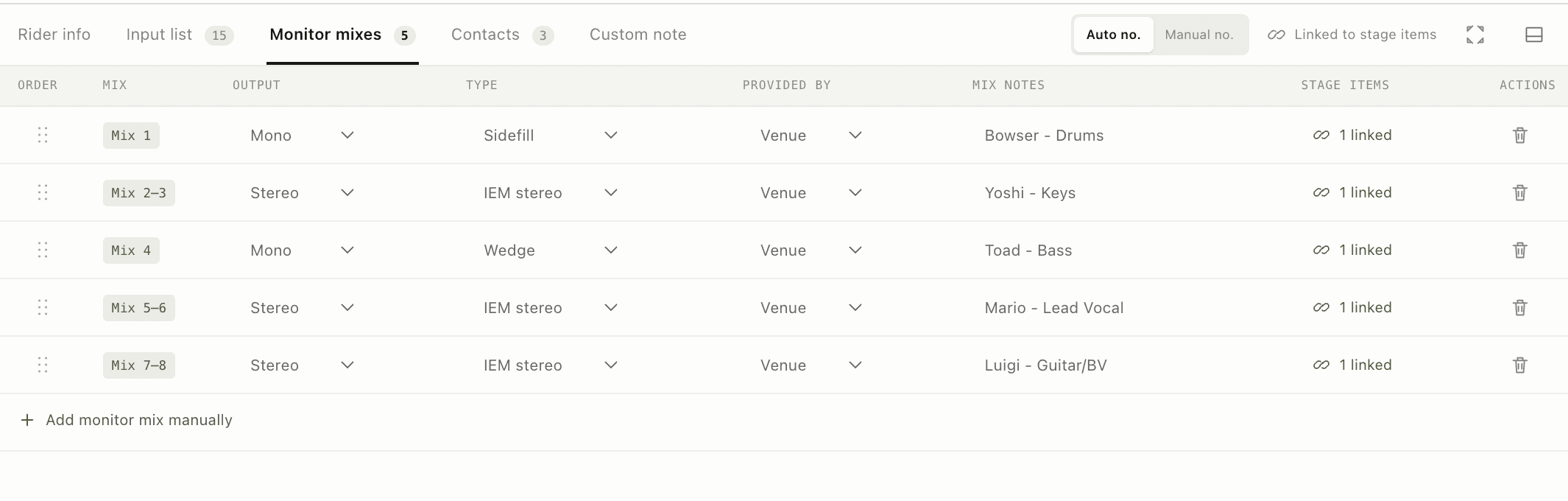
Requisitos de monitores visibles en contexto, no escondidos en notas.
Por qué importa
Describe tipo, modo, salida, notas del técnico y responsable de cada mezcla.
Planifica wedges de una salida e IEM emparejados manteniendo visibles los solapamientos.
Conecta cada mezcla con su destino físico y artista en vez de depender solo del nombre.
El flujo de trabajo
La función vive en el mismo rider que el resto del show, por lo que la siguiente persona recibe contexto, no otro documento aislado.
Añade un wedge o receptor IEM al plano.
Elige mono o estéreo y asigna la salida.
Mantén juntos posición y registro de mezcla.
Funciones conectadas
Planificación visual
Crea en un lienzo medido un plano claro para el recinto con artistas, instrumentos, monitores, energía, tarimas y notas de producción.
Una fuente de verdad
Convierte objetos del escenario en una lista ordenada y mantén alineados etiquetas, micros, DI, soportes, phantom y responsables.
Advance y día del show
Envía un enlace web siempre actualizado para el advance y usa un PDF imprimible cuando el recinto, la conexión o el flujo necesiten un documento fijo.