StageOn vs Techrider.live
10 min read · Updated July 7, 2026 · engineers, PMs, bands
Head-to-head: StageOn vs Techrider.live on multi-editor collaboration, UI, PDF + live link, data-linked input lists, and pricing. See which stage plot tool fits your crew.
Techrider.live — All personal features are free forever, with unlimited riders and exports. Only Collaboration is paid, at US$19.90/month.
TL;DR — StageOn is a modern, well-regarded web stage plot and routing tool with a deep audio workflow, ensemble templates, and shareable live links — best for solo engineers and ensembles who work on desktop. Techrider.live is the stronger pick when more than one person needs to co-edit the same rider: it ships async multi-editor collaboration, keeps plot, channels, mixes, power, and notes as one connected source, and delivers PDF + live link in sync. If you want a stageon alternative that adds co-editing without losing the routing depth, here's exactly where they differ.
Table of contents
- The 30-second version
- How we compared
- Feature-by-feature scoring
- The Techrider.live difference
- Who each tool is for
- FAQ
- What's next
The 30-second version
Both tools are modern web stage plot builders — neither is a relic of the PowerPoint era — and both understand live sound. Where they split is what happens after the first draft:
- StageOn shines at the routing layer: drag instruments onto a canvas, channels route automatically, ensemble templates (symphony, jazz, big band, wind band) jump-start larger rigs, drum-kit presets and visibility filters keep dense plots readable, and live share links let a crew view without an account. It's desktop-focused; mobile is mostly read-only, and links stay view-only — your engineer or TM can see, but not edit.
- Techrider.live is rider-first: one connected source produces your plot, input list, monitor mixes, power and backline notes, PDF, and live link. Multiple people can edit the same rider asynchronously — the owner invites ≤3 collaborators by email to open, edit, save, export, and inspect history — so the person who knows the answer can actually make the change.
Short version: StageOn for solo ensemble plotting with strong routing; Techrider.live when your engineer, TM, or band need to actually edit the same rider.
How we compared
We use the same five fixed criteria across every head-to-head in this cluster, so the comparisons are apples to apples: multi-editor collaboration, UI & interaction, PDF + live link, data-linked input list, and pricing. (See the full comparison pillar for how all the tools stack up.)
⚠️ A note on accuracy: StageOn's plans, limits, and feature set can change. Where something is uncertain — particularly pricing, mobile editing, and what the free tier includes — we say so rather than guess. Confirm the current state on StageOn's own site before you commit.
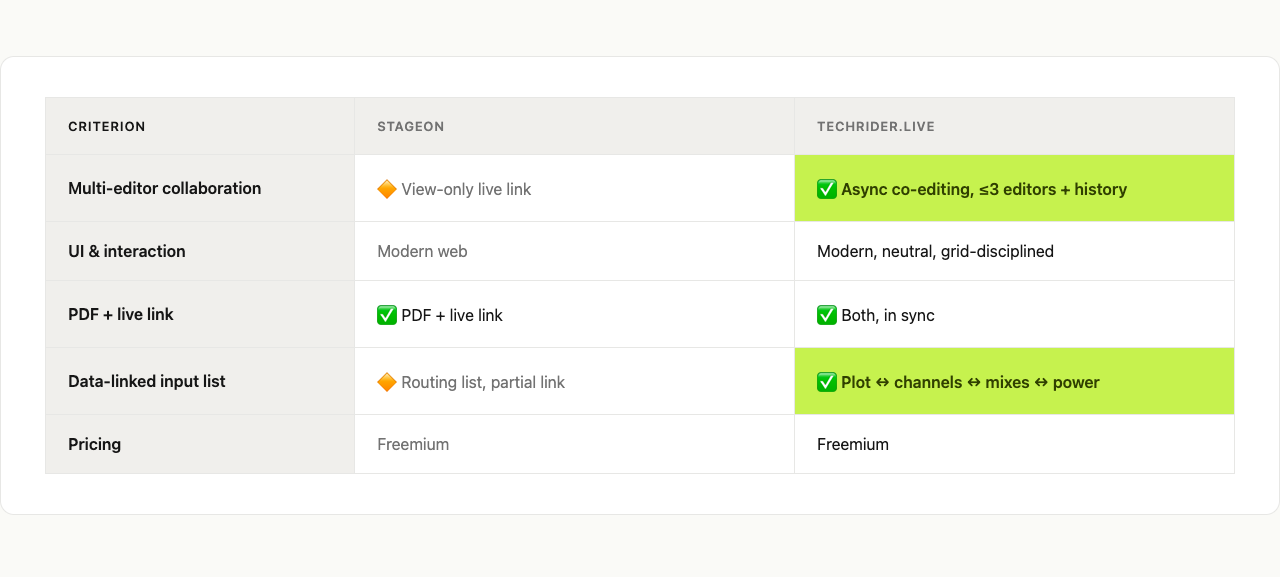
Feature-by-feature scoring
| Criterion | StageOn | Techrider.live |
|---|---|---|
| Multi-editor collaboration | 🔶 Live share links (view-only, no login to view) — collaborators can see, not edit | ✅ Async co-editing — owner invites ≤3 collaborators by email to open, edit, save, export, and inspect history (real-time co-editing is on the roadmap) |
| UI & interaction | 🔶 Modern web builder; strong audio-workflow ergonomics; desktop-focused, mobile mostly read-only | ✅ Neutral, grid-disciplined interface built for fast scanning at load-in (Linear / Notion restraint, not legacy audio-software busy) |
| PDF + live link | 🔶 Live share links + PDF / XLSX / CSV export; live link is positioned as a PDF replacement, but PDF stays a hard festival field requirement | ✅ PDF and live link in sync from one source — link is always latest, PDF is the festival-grade fallback |
| Data-linked input list | ✅ Auto-generated routing list from the plot — a genuine strength, plus drum-kit presets and ensemble templates | ✅ Plot ↔ input channels ↔ monitor mixes ↔ power notes ↔ rider notes all linked; change one, the others follow |
| Pricing | 🔶 Reported around ~$9.99/mo or ~$84/yr (verify current plans and free-tier limits) | All personal features are free forever, with unlimited riders and exports. Only Collaboration is paid, at US$19.90/month. |
Multi-editor collaboration
This is the sharpest split. StageOn's share links are genuinely useful — a TM or venue can open a plot in a browser without an account and see the current state, which beats emailing a static PDF. But the link is view-only, so when your FOH engineer spots a mislabeled channel or your monitor engineer needs to update a mix, the change still routes back through the one owner. Techrider.live lets the owner invite up to three collaborators by email to open, edit, save, export, and inspect history. That's asynchronous co-editing — one person saves, the next picks it up — not simultaneous real-time editing (which is on the roadmap). For an end-to-end walkthrough, see Collaborating on a Rider.
UI & interaction
StageOn is a modern web builder with a clear understanding of the audio workflow — auto-routing, drum-kit presets, ensemble templates, and visibility filters all speak to someone who has actually loaded in. The honest caveat is that it's desktop-focused: mobile is largely read-only, which is fine for viewing but not for editing on the bus. Techrider.live's interface is deliberately quieter — neutral black/white/gray, a single acid-green accent, a strict grid — the kind of restrained, engineer-readable UI a tired FOH can still parse at 4 p.m. changeover.
PDF + live link
StageOn markets the live link as a replacement for the PDF ("no PDF needed"), and the live link is excellent. In practice, though, PDF remains a hard field requirement at most festivals and many venues — festival networks are unreliable, FOH prints the plot, and bookers archive the rider. So the live link complements rather than replaces the PDF, and you'll still want clean PDF export. Techrider.live treats PDF and live link as a paired deliverable from one source: the link is always the latest version, the PDF is the festival-grade fallback, and you never have to remember to re-export.
Data-linked input list
Both tools are well ahead of PowerPoint here, and both auto-generate the channel list from the plot. StageOn's auto-routing list is a genuine strength — its drum-kit presets and ensemble templates (symphony, jazz, big band, wind band) are a real head start for larger rigs that most other builders don't attempt. Techrider.live makes stage items, input channels, monitor mixes, power, and rider notes one connected graph: rename a channel and the list, mix assignments, and power notes update without manual syncing. The difference is breadth of linkage rather than StageOn being weak — StageOn's ensemble and routing depth is arguably its signature feature.
Pricing
StageOn is commonly reported at around ~$9.99/month or ~$84/year, with a free tier that has project limits. Pricing changes and free-tier boundaries aren't always obvious from a glance — verify the current plans and what the free tier actually includes on StageOn's site before standardizing. Techrider.live — All personal features are free forever, with unlimited riders and exports. Only Collaboration is paid, at US$19.90/month.
The Techrider.live difference
Two things set Techrider.live apart in this matchup — the same two that run through this whole cluster.
1. Co-editing, not just sharing. The rider is the one document your whole team touches — band, engineer, TM, sometimes the venue. StageOn's view-only link is a real improvement over a static PDF, but it still forces every edit through one owner. Techrider.live's async multi-editor collaboration lets the person who knows the answer make the edit (real-time editing and presence are coming, but what ships today already solves the core problem).
2. An interface that gets out of the way. Stage plots are read under pressure — at load-in, during changeover, in a dark FOH tent. Techrider.live's neutral, grid-disciplined UI is built for that moment. Every item has a name, the plot stays synced to the channel list, and PDF and live link export from one source. For building one fast, see How to Make a Stage Plot for Your Band.
To be fair to StageOn: its ensemble templates, drum-kit presets, auto-routing list, and no-login live links are real strengths, and for a solo ensemble engineer who never needs a second editor, it's a credible, well-built choice. This isn't a hit piece — it's a question of who's editing.
Who each tool is for
Choose StageOn if:
- You're a solo engineer, MD, or ensemble lead and the routing layer is where you live.
- You plot ensembles (symphony, jazz, big band, wind band) where templates and presets save real time.
- You mainly work on desktop and only need others to view your plot.
- Live links for no-login viewing are more valuable to you than co-editing.
Choose Techrider.live if:
- Your engineer, TM, or bandmates need to edit the same rider, not just view it.
- You want one source for plot, input list, monitor mixes, power notes, PDF, and live link without manual syncing.
- You'll reuse one rider across multiple shows instead of redating a file per gig.
- You need PDF as a first-class export, not just a live link.
For the full field, the Best Stage Plot Software (2026) pillar profiles the rest of the tools across the same five criteria.
FAQ
Is StageOn free?
StageOn offers a free tier alongside paid plans — commonly reported around ~$9.99/month or ~$84/year — but the free tier has project limits, and the exact boundaries can change. Verify the current plans, free-tier limits, and any trial terms on StageOn's site before you commit.
What is the best StageOn alternative?
Depends on what you're missing. If you want multi-editor collaboration and a connected plot / input-list / monitor / power data model, Techrider.live is the most direct upgrade path — same modern-web feel, plus co-editing. For free and open-source production docs, SoundDocs is worth a look. For the full field, see our Best Stage Plot Software pillar.
Can you collaborate on StageOn?
For viewing, yes — StageOn's live share links let a crew or venue open the plot in a browser without logging in, which is great for read-only sharing. For editing, no: links are view-only, so collaborators can't edit, save, or update. If co-editing is the requirement, Techrider.live ships async multi-editor collaboration today (owner invites ≤3 editors by email; they can open, edit, save, export, and inspect history).
Does StageOn export PDF?
Yes — StageOn supports PDF, XLSX, and CSV export alongside live share links. Note that StageOn tends to position the live link as the primary deliverable, but PDF is still a hard requirement at most festivals and many venues, so you'll want clean PDF export regardless. Techrider.live pairs PDF export with a live link so the venue always has the latest version and a printable fallback.
Does StageOn work on mobile?
StageOn is desktop-focused: mobile is largely read-only, suitable for viewing a plot on a phone but not for editing one. If editing from a tablet or phone in the field matters to your workflow, that's a real constraint to weigh — and worth confirming on StageOn's site, since mobile support can evolve.
What's next
- 📐 Best Stage Plot Software (2026) — the full comparison pillar
- 🛠️ How to Make a Stage Plot for Your Band (5-minute guide) — build your first plot fast
- 🤝 Collaborating on a Rider: Invite Your Engineer or TM — how async co-editing works in practice
- 📋 Download a free stage plot template
Last updated: 2026-07-07 · Reviewed by the Techrider.live team · Criteria tested against real festival and club stage plots. StageOn details reflect publicly available information at time of writing; verify current pricing, plans, and features on StageOn's own site.
Related guides
Best Stage Plot & Tech Rider Software (2026)
We compare the 8 best stage plot and tech rider tools of 2026 by collaboration, UI, PDF + live link, input lists, and pricing — pick the right one fast.
10 min readCompareStage Plot Pro vs Techrider.live
Head-to-head: Stage Plot Pro vs Techrider.live on collaboration, UI, PDF + live link, input lists, and pricing. See which stage plot tool fits your band or crew.
8 min readCompareStagePlot Guru vs Techrider.live
Head-to-head: StagePlot Guru vs Techrider.live on collaboration, UI, PDF + live link, input lists, and cross-device access. Find your stage plot tool.
9 min read