Best Stage Plot & Tech Rider Software (2026)
10 min read · Updated July 7, 2026 · bands, engineers, PMs
We compare the 8 best stage plot and tech rider tools of 2026 by collaboration, UI, PDF + live link, input lists, and pricing — pick the right one fast.
Techrider.live — All personal features are free forever, with unlimited riders and exports. Only Collaboration is paid, at US$19.90/month.
TL;DR — The best stage plot software in 2026 depends on what you actually hand a venue: a one-off picture, or a living document the whole team can edit. We compare eight tools across five fixed criteria — multi-editor collaboration, UI & interaction, PDF + live link, data-linked input list, and pricing. For bands and engineers who need to co-edit one rider and deliver both a clean PDF and a live link, Techrider.live leads. For free or open-source, see Best Free Stage Plot Tools.
Table of contents
- How we compared
- Comparison matrix
- The 8 tools, profiled
- The Techrider.live difference
- Decision guide by role
- FAQ
How we compared
Most "best stage plot software" roundups judge tools on whether you can drag a drum kit onto a rectangle. That's the floor. By 2026 the real question is whether your engineer, tour manager, and band can all work from one source of truth — and hand a venue both a printable PDF and a live link that never goes stale.
We scored eight tools across five fixed criteria, used in every head-to-head in this cluster:
- Multi-editor collaboration — Can more than one person edit the same rider, not just view it? Techrider.live ships async multi-editor collaboration today (owner invites ≤3 collaborators by email; they can open, edit, save, export, inspect history). Real-time simultaneous editing is on the roadmap.
- UI & interaction — Modern and neutral, or legacy audio-software busy? We reward clarity and grid discipline over decoration.
- PDF + live link — Festival networks fail. You need a downloadable PDF and a live link to the latest version.
- Data-linked input list — Are the plot, input list, monitor mixes, and power notes one connected source, or files you sync by hand?
- Pricing model — Free, freemium, one-time, or subscription? Hard project limits and gated exports count against a tool.
⚠️ Several competitors' pricing and feature gates change often and aren't always published. Where uncertain, we say so rather than guess — verify on each vendor's site.
, cells filled with short ratings and notes; neutral off-white background, charcoal text, acid green #C6F24E used only for the Techrider.live row highlight; no gradients or shadows.)
Comparison matrix
| Tool | Multi-editor collaboration | UI & interaction | PDF + live link | Data-linked input list | Pricing model |
|---|---|---|---|---|---|
| Techrider.live | ✅ Async co-editing, ≤3 editors + history (real-time on roadmap) | Modern, neutral, grid-disciplined | ✅ Both, in sync | ✅ Plot ↔ channels ↔ mixes ↔ power | All personal features are free forever, with unlimited riders and exports. Only Collaboration is paid, at US$19.90/month. |
| StageOn | 🔶 View-only live link | Modern web | ✅ PDF + live link | 🔶 Routing list, partial link | Freemium |
| Stage Plot Pro | ❌ | Desktop-first, early access | 🔶 Export focus | 🔶 Stage plot + input list | Free early access (pricing TBD) |
| Stage-Plan | ❌ | Dated, legacy feel | 🔶 Free/paid gates | 🔶 Basic | Freemium with limits |
| Ridermaker | ❌ | Functional, tool-like | 🔶 Online plot + channel list | 🔶 Plot + channel list | Freemium, hard project limits |
| StagePlot Guru | ❌ | iOS/iPad app | 🔶 Weak export quality | ❌ | Paid app |
| SoundDocs | ✅ Real-time collaboration | Open-source web | 🔶 PDF export immature | 🔶 Production docs | Free / open-source |
| StageBuilder Pro | ❌ | 3D stage builder | 🔶 Export | 🔶 Plot focus | Paid (verify) |
The matrix tells the story fast: only two tools offer real co-editing — Techrider.live (async, shipped) and SoundDocs (real-time, open-source). Everyone else stops at a view-only link. That distinction matters more than any single feature.
The 8 tools, profiled
Techrider.live
A rider-first documentation system: one reusable data source generates the stage plot, input list, monitor mixes, power/backline notes, a Tech Rider PDF, and a shareable live link. Best for bands, engineers, and PMs who co-edit one rider across multiple gigs. Limitation — async, not real-time; live-link editors cap at three today (more is a roadmap entitlement).
StageOn
Modern web plot maker with automatic routing lists and channel assignments, shared via a view-only link plus PDF. Best for individual engineers wanting a fast, clean web builder. Limitations — view-only link (no true editing), weak mobile editing, no show-advance, and the live link doesn't replace a PDF day-of-show. → StageOn vs Techrider.live
Stage Plot Pro
Stage plot and input list builder in free early access, desktop-first. Best for users who want a free desktop tool and tolerate early-access edges. Limitations — desktop priority, only plot + input list coverage, and pricing is uncertain (still early access). Verify before committing. → Stage Plot Pro vs Techrider.live
Stage-Plan
Long-running web builder with a large device library. Best for users who want an established, no-frills web tool. Limitations — interaction and visuals feel dated, and the free/paid tier limits are complex and easy to hit. → Stage-Plan vs Techrider.live
Ridermaker
Online stage plot + channel list tool. Best for a quick plot plus channel list. Limitations — hard project-count limits on free, and a tool-style product with no real collaboration editing. → Ridermaker vs Techrider.live
StagePlot Guru
Long-standing iOS/iPad app. Best for users who live on an iPad. Limitations — App Store ratings are low across multiple regions, with reports of weak export quality, save losses, and editing difficulty. If you ship to festivals, export quality is the dealbreaker. → StagePlot Guru vs Techrider.live
SoundDocs
Free, open-source production docs with real-time collaboration. Best for technically minded teams who want OSS and can self-host. Limitation — PDF export is still immature, limiting day-of-show delivery; commercial tools compete on stability, templates, and export. See Best Free Stage Plot Tools.
StageBuilder Pro
A 3D stage plot builder. Best for large productions where 3D genuinely communicates risers, height, and sightlines. Limitation — 3D can reduce readability for a typical band plot; a clean 2D top-down view is usually the better first choice. (Pricing not always published — verify.)
Where a competitor genuinely wins, we say so: StageBuilder Pro is the strongest option if you specifically need 3D, and SoundDocs is the strongest choice for free, open-source software with real-time collaboration. Techrider.live doesn't try to win those two fights — it wins on co-editing a rider that ships as both PDF and live link.
The Techrider.live difference
Two things separate Techrider.live from the field — the same two we expand on in every head-to-head in this cluster.
1. Co-editing one rider, not just sharing a view. Most "share" buttons here produce a view-only link. That's useful, but it isn't collaboration — your engineer still can't fix a channel name or move a wedge. Techrider.live ships async multi-editor collaboration: the owner invites up to three collaborators by email, and each can open, edit, save, export, and inspect the rider's history. One person edits and saves, the next picks up from there. (Real-time simultaneous editing and presence are on the roadmap; team workspaces and lifting the three-editor cap are coming as subscription entitlements.)
2. An interface that doesn't fight you. Neutral black/white/gray with a single acid-green accent, flat and daylight-neutral, on a strict 12-column grid, with 120–140ms micro-interactions — the restrained feel of Linear, Notion, or Apple, not the busy tool-style UI of legacy audio software. Every screenshot in this cluster is itself an interface statement.
Underneath both, the data is linked: stage items, input channels, monitor mixes, power, and rider notes reference one source. Move a mic on the plot and its channel moves with it. Then you export a PDF and a live link from the same file — because festivals need paper and your TM needs the latest version.
→ Deeper dive: Best Stage Plot Software for Collaboration & Teams
Decision guide by role
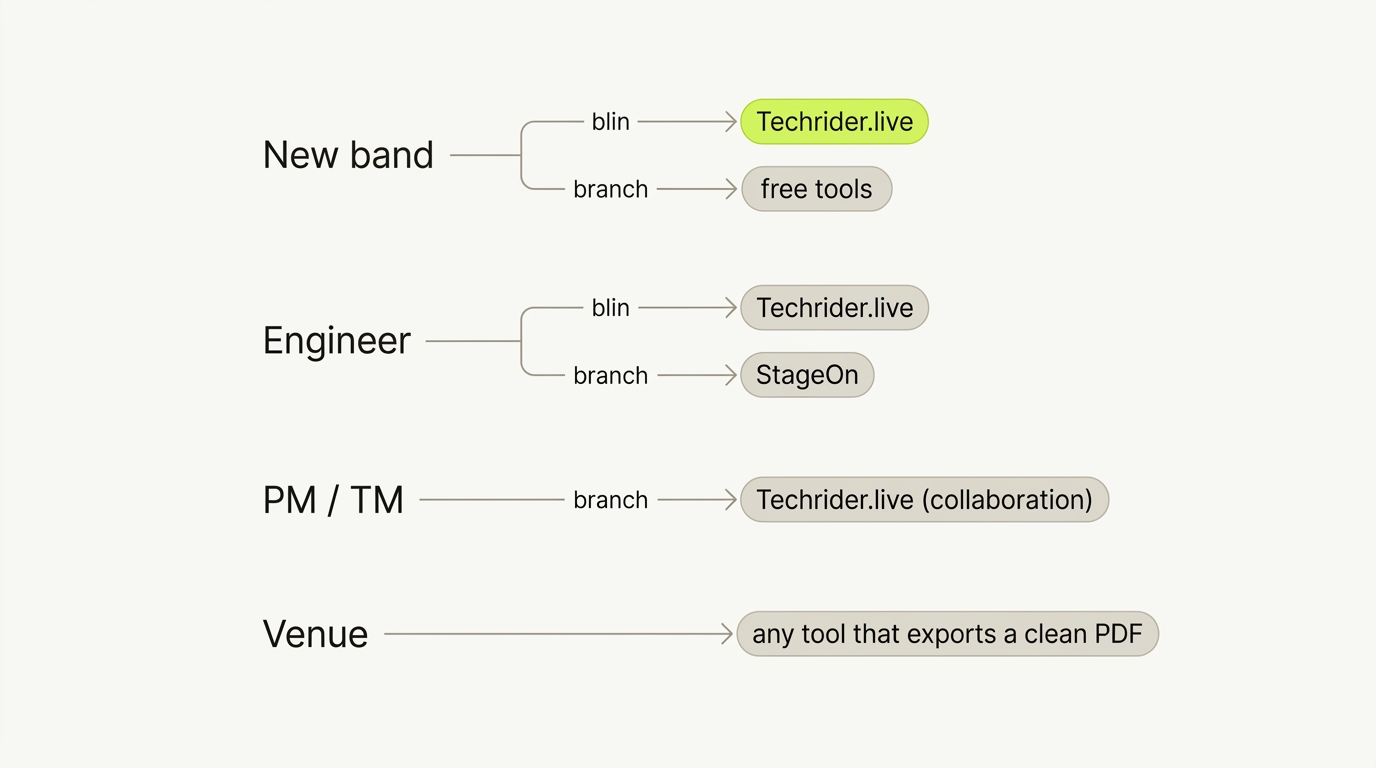
New band, first plot. You want fast, free-ish, and a result a venue respects. Start with Techrider.live — All personal features are free forever, with unlimited riders and exports. Only Collaboration is paid, at US$19.90/month. → Best Free Stage Plot Tools · How to Make a Stage Plot
Sound engineer. You want an engineer-readable plot, a clean input list, and a PDF that survives a bad festival network. Techrider.live or StageOn are the strongest modern web picks; Techrider.live additionally lets you edit the rider you received instead of redlining a PDF by hand.
Production / tour manager. Your job is version control and advance. Pick the tool that lets multiple people edit one rider and ships both a PDF and a live link — Techrider.live today. If OSS matters, evaluate SoundDocs alongside it.
Venue / house tech. You mostly receive plots. Push acts toward any tool that exports a clean, labeled PDF — and prefer a live link so you hold the latest version. A tool that links the plot to the input list saves you patch errors at changeover.
FAQ
What is the best stage plot software? No single winner — it depends on whether you need co-editing, a free tool, or 3D. For co-editing one rider with PDF + live link, Techrider.live leads. For free/OSS with real-time collaboration, SoundDocs. For 3D, StageBuilder Pro. Use the matrix above.
Is there a free stage plot maker? Yes. Stage Plot Pro is free in early access, SoundDocs is free and open-source, and StageOn, Stage-Plan, Ridermaker, and Techrider.live all have free tiers. The catch is usually limits — project counts, export quality, or gated features. → Best Free Stage Plot Tools.
What is the best tech rider software (not just a stage plot)? A stage plot is one part of a rider. If you want one tool producing the whole rider — plot, input list, monitor mixes, power/backline notes, PDF plus live link — look at rider-first tools like Techrider.live. Plot-only tools (StagePlot Guru, StageBuilder Pro) stop at the picture. (What is a tech rider? →)
Can you collaborate on a stage plot? Mostly no — most tools offer only a view-only link. Techrider.live ships async multi-editor collaboration (owner invites ≤3 editors; they edit, save, export, inspect history). SoundDocs offers real-time collaboration as OSS. Real-time co-editing on Techrider.live is on the roadmap. → Collaboration & Teams
What is the best stage plot app for bands? For a touring band keeping one rider current, pick a tool with collaboration, PDF + live link, and a data-linked input list — Techrider.live. If you only make one plot on an iPad, StagePlot Guru is the native option, but mind the export-quality and save-loss reports. → StagePlot Guru vs Techrider.live
Related comparisons
This article is the hub for the comparison cluster. Each head-to-head uses the same five criteria, so scores stay consistent:
- Stage Plot Pro vs Techrider.live · StageOn vs Techrider.live · StagePlot Guru vs Techrider.live · Ridermaker vs Techrider.live · Stage-Plan vs Techrider.live
- Best Free Stage Plot Tools (2026) · Best Stage Plot Software for Collaboration & Teams
New here? Start with What Is a Stage Plot?, then How to Make a Stage Plot for Your Band.
Last updated: 2026-07-07 · Reviewed by the Techrider.live team · Criteria tested against real festival and club stage plots. Competitor details reflect publicly available information as of the review date; verify pricing and feature gates on each vendor's site before committing.
Related guides
Stage Plot Pro vs Techrider.live
Head-to-head: Stage Plot Pro vs Techrider.live on collaboration, UI, PDF + live link, input lists, and pricing. See which stage plot tool fits your band or crew.
8 min readCompareStageOn vs Techrider.live
Head-to-head: StageOn vs Techrider.live on multi-editor collaboration, UI, PDF + live link, data-linked input lists, and pricing. See which stage plot tool fits your crew.
10 min readCompareStagePlot Guru vs Techrider.live
Head-to-head: StagePlot Guru vs Techrider.live on collaboration, UI, PDF + live link, input lists, and cross-device access. Find your stage plot tool.
9 min read