StagePlot Guru vs Techrider.live
9 min read · Updated July 7, 2026 · bands, engineers
Head-to-head: StagePlot Guru vs Techrider.live on collaboration, UI, PDF + live link, input lists, and cross-device access. Find your stage plot tool.
Techrider.live — All personal features are free forever, with unlimited riders and exports. Only Collaboration is paid, at US$19.90/month.
TL;DR — StagePlot Guru is a long-standing iOS/iPad app: a 250+ prop library, unlimited plots, and a one-time purchase with no subscription — a solid pick if you live on an iPad and work solo. Techrider.live is the stronger pick when your band, engineer, or TM need to co-edit one rider, work across desktop/tablet/mobile from any browser, and keep plot, input list, mixes, PDF, and live link as one connected source. If you're hunting a stageplot guru alternative that adds collaboration and cross-device access, here's where they differ.
Table of contents
- The 30-second version
- How we compared
- Feature-by-feature scoring
- The Techrider.live difference
- Who each tool is for
- FAQ
The 30-second version
Both produce a stage plot you can hand a venue. Where they split is the platform, the workflow after the first draft, and who can touch the document:
- StagePlot Guru is a native iOS/iPad app: ~250+ props, unlimited plots, tech info per prop, logo/contact info, input/equipment/notes lists, and PDF/share via email/AirDrop/print. You buy it once and own it, and the iPad drag-and-drop is genuinely good. Known trade-offs (per App Store reviews across regions): export quality (cropping, low-res), reports of saved plots lost, a paywall some find misleading, and an editor hard to rotate, zoom, or refine on smaller screens.
- Techrider.live is a cross-device web tool, rider-first: one source produces plot, input list, monitor mixes, power notes, PDF, and live link. Multiple people can edit the same rider asynchronously (owner invites up to 3 collaborators by email to open, edit, save, export, inspect history), so your engineer and TM aren't stuck read-only.
Short version: StagePlot Guru for iPad-native solo drawing with a one-time buy; Techrider.live when more than one person needs to touch the rider, or you don't want to be locked to an iPad.
How we compared
We use the same five fixed criteria across every head-to-head in this cluster — multi-editor collaboration, UI & interaction, PDF + live link, data-linked input list, and pricing/platform — so you can compare apples to apples. (See the full comparison pillar for how all eight tools stack up.)
⚠️ A note on accuracy and fairness. StagePlot Guru is an established app with a loyal user base — many reviewers love the iPad drag-drop flow, the prop library, and the one-time-purchase model. The pain points we cite (export quality, lost plots, regional ratings, editor friction) come from our scoping research and publicly visible App Store reviews; they reflect common complaints, not every user's experience, and change over time. Confirm the current state on StagePlot Guru's own site and App Store listing before you commit.
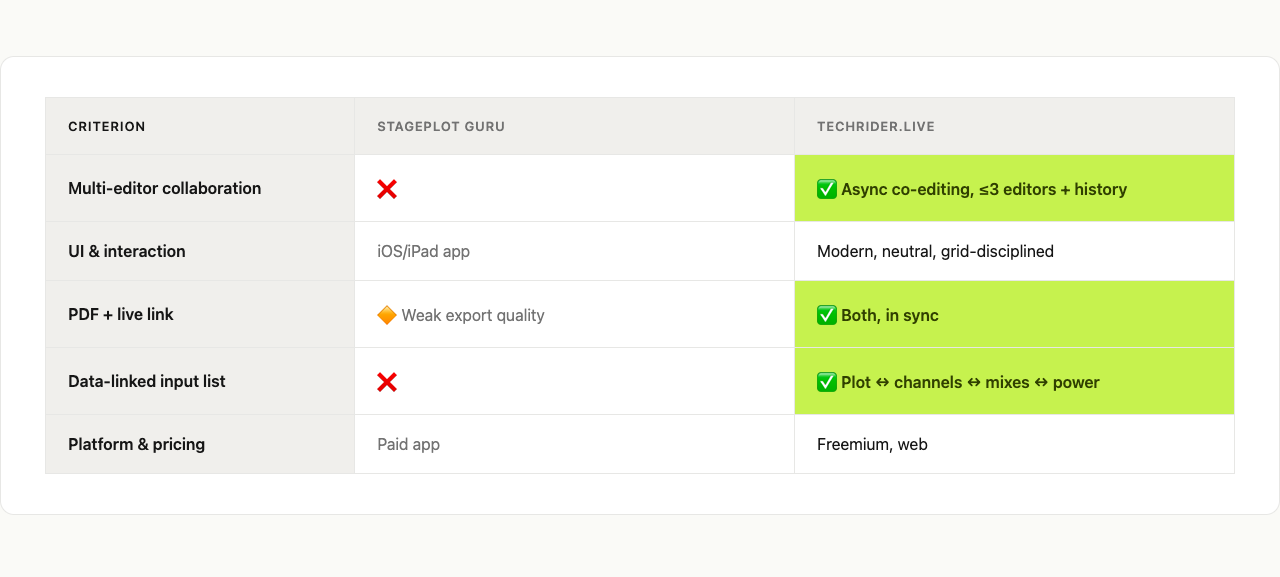
Feature-by-feature scoring
| Criterion | StagePlot Guru | Techrider.live |
|---|---|---|
| Multi-editor collaboration | ❌ Solo editing on one device; recipients get a PDF, not an editable document | ✅ Async co-editing — owner invites ≤3 collaborators by email to open, edit, save, export, and inspect history (real-time co-editing is on the roadmap) |
| UI & interaction | 🔶 Native iPad drag-and-drop; ~250+ props; reviewer complaints about hard-to-rotate/zoom/edit, janky on iPhone | ✅ Modern, neutral, grid-disciplined web UI (Linear / Notion restraint); works with mouse, trackpad, and touch |
| PDF + live link | 🔶 Email/AirDrop/print/share PDF; reviewer complaints about cropping and low-res output | ✅ PDF and live link in sync — both stay current with one source |
| Data-linked input list | 🔶 Input/equipment/notes lists captured per plot; not deeply linked to a live data graph | ✅ Plot ↔ channels ↔ monitor mixes ↔ power notes all linked; change one, the others follow |
| Platform & pricing | 🔶 iOS/iPad only; one-time purchase, no subscription — verify current tier/price | All personal features are free forever, with unlimited riders and exports. Only Collaboration is paid, at US$19.90/month. |
Multi-editor collaboration
The biggest gap. StagePlot Guru is built for one person on one iPad — you can email or AirDrop the finished PDF, but a collaborator can't open the live document to fix a channel or update a backline note. Techrider.live lets the owner invite up to three collaborators by email to open, edit, save, export, and inspect history — asynchronous co-editing (one person saves, the next picks it up), not simultaneous real-time editing (on the roadmap).
UI & interaction
StagePlot Guru's strengths are real: iPad drag-and-drop is satisfying and the 250+ prop library covers a lot of ground. The flip side — per App Store reviews — is an editor some find unintuitive: hard to rotate or zoom items, janky on iPhone, frustrating once a plot gets dense. Techrider.live makes the opposite trade: less touch-native than a purpose-built iPad app, but its neutral palette, single acid-green accent, and strict grid produce a plot still engineer-readable at 4 p.m. load-in.
PDF + live link
StagePlot Guru exports PDFs and shares via email/AirDrop/print — fine for "hand the venue a file." The recurring complaint is export quality: cropped, low-res output that looks poor at festival size. Techrider.live treats PDF and live link as a paired deliverable — the link is always latest, the PDF is the festival-grade fallback for when Wi-Fi dies, and both come from one source so they never disagree.
Data-linked input list
Both capture inputs alongside the plot — already ahead of PowerPoint. StagePlot Guru stores tech info per prop plus input/equipment/notes lists. Techrider.live makes stage items, channels, monitor mixes, power, and notes one connected graph: rename a channel and the list, mix assignments, and power notes follow — killing the "channel 14 on the plot is channel 12 on the list" errors that derail soundchecks.
Platform & pricing
StagePlot Guru has a genuine advantage worth naming: a one-time purchase with no subscription, in a market drifting toward recurring billing. The catch is platform lock — iOS/iPad only, no Android, Windows, or browser. Techrider.live — All personal features are free forever, with unlimited riders and exports. Only Collaboration is paid, at US$19.90/month. Techrider.live personal use is free across devices; a subscription is only needed for Collaboration.
The Techrider.live difference
Two things set Techrider.live apart — the same two that run through this cluster.
1. Co-editing, not just sharing. The rider is the one document your whole team touches. A PDF emailed from an iPad forces every change through one bottleneck. Techrider.live's async multi-editor collaboration lets the person who knows the answer make the edit (real-time editing and presence are coming, but what ships today already solves the problem).
2. An interface that gets out of the way — and a plot that travels. Stage plots are read under pressure: at load-in, during changeover, in a dark FOH tent. Techrider.live's grid-disciplined UI is built for that moment — every item named, the plot synced to the channel list, PDF and live link from one source. And because it's the web, your plot opens on whatever device the next person is holding. For building your first one, see How to Make a Stage Plot for Your Band.
Who each tool is for
Choose StagePlot Guru if:
- You live on an iPad and want native touch-first drag-and-drop.
- You work solo and "the band's plot lives on my tablet" is fine.
- You want a one-time purchase, no subscription, and iOS-only is acceptable.
Choose Techrider.live if:
- Your engineer, TM, or bandmates need to edit the same rider.
- Your team is on mixed devices (Mac, Windows, Android, iPad, phone).
- You want one source for plot, input list, mixes, power notes, PDF, and live link without manual syncing.
For the full field, the Best Stage Plot Software (2026) pillar profiles six more tools across the same five criteria.
FAQ
Is StagePlot Guru free? Not entirely — it's a paid app with a one-time purchase model (no subscription), which is part of its appeal. There has historically been a free/lite tier and a paid unlock, and some reviewers find the paywall confusing. Verify current tiers and price on the App Store listing for your region before buying.
What is the best StagePlot Guru alternative? Depends on what you're missing. If you want multi-editor collaboration, cross-device web access, and a connected plot/input-list/monitor/power data model, Techrider.live is the most direct upgrade path. For free and open-source, SoundDocs is worth a look. For the full field, see our Best Stage Plot Software pillar.
Can you collaborate on StagePlot Guru? Not for editing. You can share a finished PDF via email, AirDrop, or print, but a collaborator can't open the live document, edit, save, or update it. If co-editing is the requirement, Techrider.live ships async multi-editor collaboration today (owner invites ≤3 editors by email; they can open, edit, save, export, inspect history).
Does StagePlot Guru work on Android or Windows? No — it's iOS/iPadOS only, with no Android, Windows, or browser version. Anyone outside the Apple ecosystem can't open or edit your plot. If your team is cross-platform, that's the single biggest reason to look at a web-based alternative like Techrider.live.
Does StagePlot Guru export PDF? Yes — it exports PDFs and supports email/AirDrop/print/share. The recurring complaint is export quality: cropping and low resolution that can look poor printed at festival size. Techrider.live pairs PDF export with a live link so the venue always has the latest version and a clean printable fallback.
What's next
- 📐 Best Stage Plot Software (2026) — the full eight-tool comparison pillar
- 🛠️ How to Make a Stage Plot for Your Band (5-minute guide) — build your first plot fast
- 📋 Download a free stage plot template
- 🤝 Collaborating on a Rider: Invite Your Engineer or TM — how async co-editing works in practice
Last updated: 2026-07-07 · Reviewed by the Techrider.live team · Criteria tested against real festival and club stage plots. Competitor details reflect publicly available information at time of writing, including App Store reviews; ratings, pricing, and features change over time — verify current state on StagePlot Guru's own site and App Store listing before you commit.
Related guides
Best Stage Plot & Tech Rider Software (2026)
We compare the 8 best stage plot and tech rider tools of 2026 by collaboration, UI, PDF + live link, input lists, and pricing — pick the right one fast.
10 min readCompareStage Plot Pro vs Techrider.live
Head-to-head: Stage Plot Pro vs Techrider.live on collaboration, UI, PDF + live link, input lists, and pricing. See which stage plot tool fits your band or crew.
8 min readCompareStageOn vs Techrider.live
Head-to-head: StageOn vs Techrider.live on multi-editor collaboration, UI, PDF + live link, data-linked input lists, and pricing. See which stage plot tool fits your crew.
10 min read