Input List vs Patch Sheet: What's the Difference?
9 min read · Updated July 7, 2026 · bands, engineers, anyone preparing show paperwork
An input list says what each channel IS. A patch sheet says where it physically patches. Learn the columns each contains, where they overlap, and why keeping them linked beats two drifting files.
TL;DR — An input list is a channel-by-channel table of every source on stage — what each channel is, the mic or DI, the stand, whether it needs phantom power. A patch sheet (patch list, stage patch) is about where those signals physically land: which snake or stagebox socket, how the splitter routes, which console input. They overlap, and people use the terms loosely — but the cleanest mental model is: the input list answers "what," the patch sheet answers "where and how."
Table of contents
- What is an input list?
- What is a patch sheet?
- Input list vs patch sheet, side by side
- Where they overlap (and why the terms blur)
- Do you need both?
- Keeping them linked
- FAQ
- What's next
- Further reading
What is an input list?
An input list (sometimes called a channel list) is a one-row-per-source table that tells the front-of-house and monitor engineers what each input on the console is and what it needs. Where your stage plot shows where things go, the input list shows what each channel carries — working down the console from channel 1.
The input list is the document you send outward to venues and festivals as part of your technical rider. A good one lets the FOH engineer label the console, choose mics, and switch phantom power before you ever load in.
A typical row contains:
- Ch # — the console channel number.
- Input / Source — what's being picked up ("Kick In," "Lead Vocal").
- Mic / DI — the specific model or "DI" for a direct box.
- Stand — boom, short, clip, none.
- 48V — whether phantom power is required.
- Notes — stereo links, pads, HPF, talkback.
The standard ordering convention is drums → bass → guitars → keys → vocals, starting the kick drum on channel 1 so an engineer's muscle memory matches your list. For a full walkthrough of the columns and ordering, see How to Build an Input List / Patch Sheet.
What is a patch sheet?
A patch sheet (also called a patch list, stage patch, or I/O sheet) is the physical-routing companion. It maps each of those channels to a real socket on the stagebox or snake, the cable that lands there, the splitter routing (FOH / monitor / broadcast splits), and ultimately the console input it's assigned to. It's the document the stage tech or A2 uses to physically wire the stage.
Where the input list answers "what are the sources and what do they need?", the patch sheet answers "how do I physically wire this?" — which socket on which stagebox, through which loom or sub-snake, into which input on the console, and how the signal is split downstream.
A touring-grade patch sheet adds columns the input list usually doesn't carry:
- Stagebox ID + socket — e.g.
SB1-07. - Sub-snake / loom / multi-pin — which multipin or sub-snake carries it.
- Splitter routing — FOH, monitor, broadcast, recording splits.
- Console input — the exact console input it lands on (relevant when a digital snake's input number differs from the console channel).
- Tie-line / patch-bay jumps — for festival stages with fixed tie-lines.
In short: the patch sheet is the map of the physical patch, not the channel's identity.
Input list vs patch sheet, side by side
The fastest way to see the distinction is to put the two tables next to each other. Some columns (channel number, source name, mic/DI) appear in both — that's the overlap. Others (48V, stand) belong to the input list; others (stagebox socket, sub-snake, split routing) belong to the patch sheet.
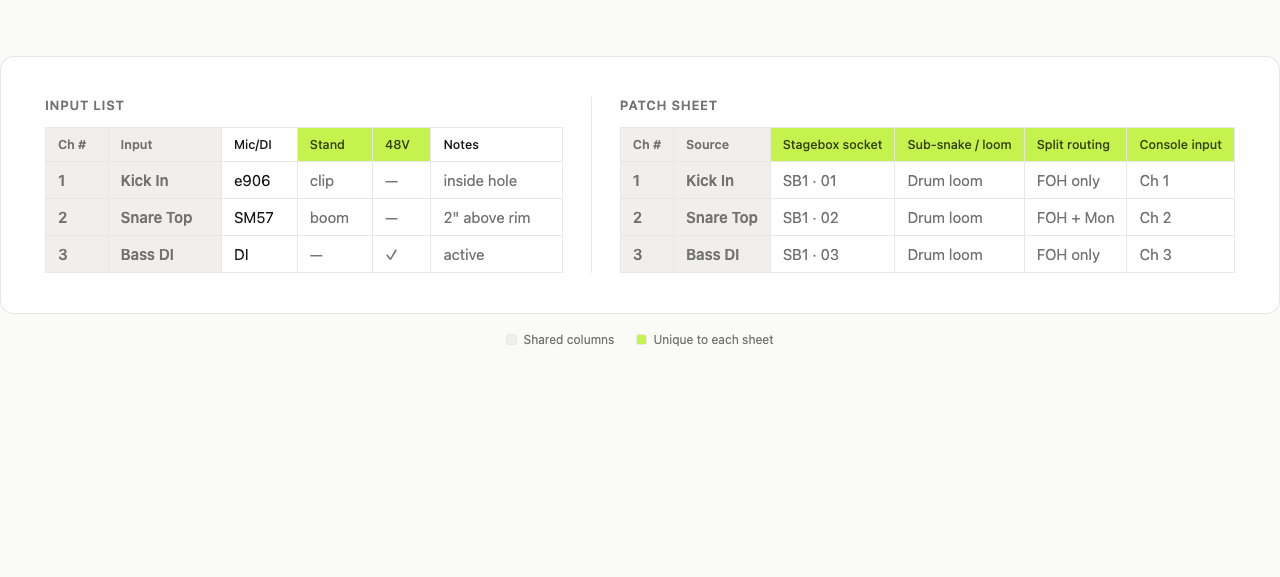 Fig. 1 — Input list and patch sheet side by side. Shared columns sit in the middle; input-list-only and patch-sheet-only columns are highlighted in acid green.
The shared spine — channel number and source name — is exactly why the two documents tend to drift out of sync: someone reorders channels, and now the patch sheet says one thing while the input list says another.
Where they overlap (and why the terms blur)
Here's the honest part: in the wild, these two terms are not used consistently.
At a small club gig, one sheet usually does both jobs — the same table lists the channel, instrument, mic, and the stagebox socket it lands on, and everyone calls it "the input list." At that scale, a patch sheet and an input list are effectively the same document, and that's fine.
At a touring or festival scale, they split apart. The input list travels outward to the venue or festival as part of the rider — it's about identity and needs. The patch sheet is often the production's internal document the A2 uses on the day — it's about physical wiring, splitter feeds, and console input assignment. Some sources even define a "patch list" to include the input list itself, because the same channel spine runs through both.
So don't draw a hard wall. The clean mental model is the axis of intent:
- Input list → "what" — what each channel is, what mic, what it needs.
- Patch sheet → "where / how" — where each signal physically patches and how it's routed.
Most of the confusion comes from one document quietly doing both jobs. The bigger the show, the more that stops being safe.
Do you need both?
For most bands: one combined sheet is enough. List each channel with its source, mic/DI, stand, 48V, and the stagebox socket it lands on. That single table covers both "what" and "where" up to a fairly large channel count.
You'll want them as separate documents when:
- You're touring with a split system — FOH, monitors, and broadcast each need their own feed off the splitter. The patch sheet tracks those splits; the input list doesn't care.
- A digital snake's input numbering differs from the console's — channel 7 on the console might be socket 23 on the stagebox. The patch sheet reconciles that; the input list just says "channel 7."
- Festival changeovers — a fixed festival stage has tie-lines and a house patch the band's input list has to map onto. The patch sheet is that mapping.
- Multiple people are wiring the stage — the A2 patching the snake needs the physical document; the FOH engineer mixing needs the identity document.
If you're a 4- or 5-piece band sending paperwork to clubs, you almost certainly just need one good input list that includes a Patch column for the stagebox socket. (Here's how to build it →)
Keeping them linked
The real risk isn't that you have two documents — it's that they drift. The classic day-of-show error: channel 7 is "Guitar 1" on the input list but "Guitar 2" on the patch sheet, because someone reordered channels in one place and not the other. Now the FOH engineer is mixing the wrong guitar into the wrong DCA.
The modern fix isn't a better filing system — it's a single connected source. When the input list, the stage plot, and the monitor mixes all read from the same data, reordering a channel updates every view at once, and the patch column stays tied to the channel it belongs to.
That's a lot of what Techrider.live is built around: one Rider as the source of truth, with the stage plot, input list, and mixes generated from it — then exported as both a live link (always the latest version) and a PDF (the day-of-show safety belt when festival Wi-Fi fails). You edit once; the two documents can never disagree because they aren't really two.
And because the same Rider can be shared and co-edited — the owner invites a collaborator by email to open, edit, save, export, and inspect history — your engineer or tour manager can patch the list themselves instead of emailing a spreadsheet back and forth. (Real-time simultaneous editing is on the roadmap; today it's async, one editor at a time.)
FAQ
Is an input list the same as a patch sheet? At small gigs, often yes — one combined table does both jobs. At touring or festival scale, they're distinct: the input list describes what each channel is and needs (sent outward to the venue); the patch sheet maps each channel to physical stagebox sockets, looms, splitter splits, and console inputs (used internally on the day). The terms blur because they share the same channel spine.
What is a patch sheet in live sound? A patch sheet (patch list, stage patch) documents the physical patch — which snake or stagebox socket each input lands on, the sub-snake or loom carrying it, how it's split (FOH / monitors / broadcast), and which console input it's assigned to. It's the wiring map the A2 uses on stage.
What goes on an input list? At minimum: channel number, instrument/source, mic or DI, stand type, phantom power (48V) flag, and notes (stereo links, pads, talkback). Many include a Patch column for the stagebox socket, which is where the input list starts overlapping with the patch sheet.
What goes on a patch sheet? Channel number, source name, stagebox ID + socket, sub-snake / loom / multi-pin, splitter routing (FOH / monitor / broadcast), console input assignment, and any tie-line or patch-bay jumps. Touring sheets may also add DCA/VCA and group/bus routing.
Do I need both an input list and a patch sheet? For most bands, one combined input list with a Patch column is enough. You need them separate when you tour with a split system, when the digital snake's numbering differs from the console's, at festival changeovers, or when multiple crew are wiring the stage and the A2 needs a dedicated physical document.
What's next
- 🎛️ Build an input list / patch sheet (with template) — the full step-by-step, columns, and ordering.
- 🗺️ What Is a Stage Plot? — the "where" document that pairs with your channel list.
- 📄 What Is a Tech Rider? — how the input list fits inside the full rider.
Further reading
- Best Practices in Developing Input Lists and Stage Plots — ProSoundWeb
- How to Make an Input List, Stage Plot and Patch a Stage — SoundGirls
- Patch List — Crescat Glossary
Last updated: 2026-07-07 · Reviewed by the Techrider.live team · Tested against real festival and club stage plots.
Related guides
What Is a Stage Plot? (And How to Read One)
A stage plot is a top-down map of your band's stage setup. Learn what goes on it, how it differs from an input list and tech rider, and what makes one engineer-readable.
6 min readBasicsWhat Is a Tech Rider? (Sections Explained)
A tech rider is the full technical package a band sends a venue — console, monitors, PA, backline, power, stage plot, input list, hospitality. Learn every section.
7 min readBasicsStage Plot Symbols & Legend Explained
A visual glossary of stage plot symbols — mics, DI boxes, wedges, IEM packs, drums, amps, keys, power drops. Learn what each icon means and how to read any stage plot.
7 min read