How to Build an Input List / Patch Sheet (with Template)
7 min read · Updated August 13, 2026 · engineers, bands
A channel-by-channel table of every source on stage. Learn the input list columns, the drums-to-vocals ordering, 48V and DI rules, and how a patch sheet differs.
Build yours: Create, check, and export a channel list with the free Input List & Patch Sheet Generator. No login required.
TL;DR — An input list is a channel-by-channel table of every source on stage: channel number, instrument, mic or DI, stand type, phantom power (48V) flag, and where it patches on the stagebox. It's what FOH reads to prep the console before you arrive. A patch sheet is the internal wiring companion that maps those channels to physical sockets and cables. Build them in a drums → bass → guitars → keys → vocals order and keep the list synced to your stage plot so the numbers never drift.
What is an input list?
An input list (also called a channel list) tells the front-of-house and monitor engineers what each input on the console is and what it needs. Where your stage plot shows where things go, the input list shows what each channel carries — one row per input, working down the console from channel 1. Most bands send it in advance as part of the technical rider, so the console is labeled and patched before load-in.
The biggest day-of-show errors come from the input list and stage plot disagreeing — channel 7 is "Guitar 1" on the table but "Guitar 2" on the plot. Keeping them as one connected data source fixes that.
Input list vs patch sheet
- An input list is a logical document — the sources and their needs (instrument, mic or DI, stand, phantom power, notes). You send it outward to venues and festivals.
- A patch sheet (patch list / I/O sheet) is a physical-routing document — it maps each channel to a real socket on the stagebox or sub-snake, the cable that lands there, and the loom carrying it to the console. It's the touring band's internal document the A2 uses on the day.
In short: the input list answers "what are the sources and what do they need?"; the patch sheet answers "how do I physically wire this?" Small gigs often collapse them into one sheet; bigger productions keep them separate. → Input List vs Patch Sheet
The columns on an input list
Every input list boils down to a handful of columns — here's the anatomy of one row:
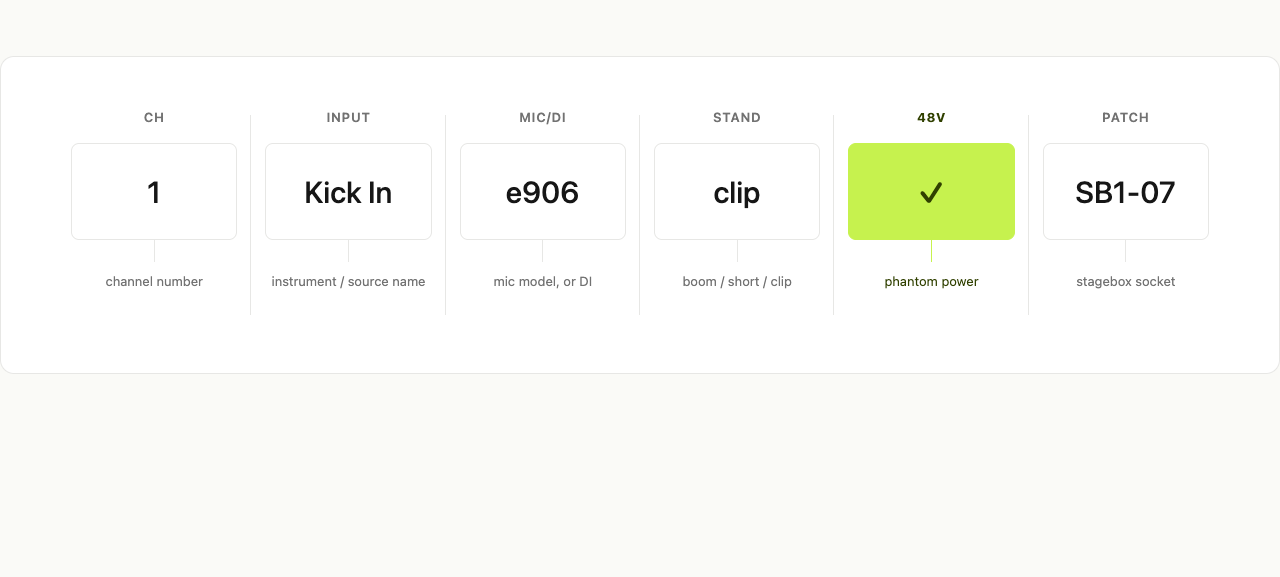
| Column | What it captures | Example |
|---|---|---|
| Ch # | Channel number on the console | 1 |
| Input / Source | What's being picked up | "Kick In" |
| Mic / DI | Mic model or "DI" for a direct box | Beta 91A |
| Stand | Stand type the mic lives on | Short |
| 48V | Whether phantom power is required | ✓ |
| Patch | Stagebox socket / snake location | SB1-07 |
| Notes | Stereo link, pad, HPF, sub-snake | Stereo w/ ch.2 |
That's the minimum. Touring patch sheets add DCA/VCA assignment, group/bus routing, sub-snake ID, and loom/multi-pin — useful for the A2, overkill at a club gig.
How to make an input list
1. Number from the kick drum, then group. Start channel 1 at the kick and work outward: drums → bass → guitars → keys → vocals. It's the convention almost every console follows, so the FOH engineer's muscle memory matches your list. A 4-piece lands around 16–20 channels — drums (1–8: kick in/out, snare top/bottom, hi-hat, toms, overheads), bass (9, DI and/or cab mic), guitars (10–11), keys (12–13, stereo), vocals (14–18).
2. Mark every mic or DI. Write the specific model (SM57, Beta 52A, e904) or "DI" for a direct box — needed for instruments that plug in rather than get miked: bass, keys, acoustic guitar with a pickup, laptop playback. Don't write "vocal mic" — write "SM58."
3. Flag phantom power (48V). Tick 48V for any condenser mic or active DI — +48V powers them down the XLR. Leave it OFF for ribbon mics, which it can damage.
4. Specify stands and clips. The stand column lets a house tech pre-place every stand before you arrive. Use short values: boom, short boom, straight, clip (drum rims), none.
If your workflow does not need stand details, hide the Stand column under Settings → Preferences. Showing it again preserves the values already entered and provides common stand types as suggestions while still accepting free text.
5. Map the patch (stagebox location). The patch column says where each input lands on the stagebox — a stagebox ID plus socket number, like SB1-07. This bridges the input list and the physical patch sheet: the number that's "channel 7" on the console is "socket 7 on stagebox 1" on stage.
6. Add the notes that save a call. Use Notes for anything non-obvious: stereo links (stereo w/ ch.2), pads, high-pass filters, talkback, click/cue tracks, outboard inserts.
, bass (9), guitars (10–11), keys (12–13 stereo), vocals (14–18); the 48V column checked on overheads, snare bottom, and active DI rows; clean neutral table UI, acid green accent on the stereo-grouped keys rows, no clutter.)
Keeping the input list synced to your stage plot
Most bands lose time here: the stage plot in one tool, the input list in a spreadsheet, the monitor mixes in a third doc — and the moment someone swaps two channels, all three disagree.
In Techrider.live they share one data model: each channel row links to a stage item and to the mixes it feeds, so adding a mic to the plot creates its channel row, reordering the list updates the plot labels, and routing a channel to a mix updates both. You edit one source of truth, then export a live link (always latest) and a PDF (the day-of-show safety belt when festival Wi-Fi fails).
A starting template you can copy
Techrider.live generates the input list from your stage plot — add a kick, a snare, a vocal mic, and the channel rows populate themselves with the mic/DI, stand, and 48V columns already in place. Then export as PDF or share the live link with your engineer. Start from a free stage plot template and the input list comes with it.
FAQ
What columns should be on an input list? At minimum: channel number, instrument/source, mic or DI, stand type, phantom power (48V) flag, and patch/stagebox location. Touring productions add DCA/VCA, group/bus, sub-snake, and notes.
Is a patch sheet the same as an input list? No. The input list describes sources and their needs; the patch sheet maps channels to physical stagebox sockets, cables, and looms. You send the input list out; you keep the patch sheet internal. (More →)
Does a condenser microphone need phantom power? Yes — condenser mics and active DIs need +48V to operate. Ribbon mics generally do not and can be damaged by phantom power, so leave 48V off on ribbon channels.
What order should inputs be on a console? Drums first (kick on channel 1), then bass, guitars, keys, vocals, then playback/talkback. This matches engineers' muscle memory and groups instruments for DCA assignment.
Do I need a DI box? For any instrument that outputs at line or instrument level and must travel down an XLR — bass, keyboards, acoustic guitar with a pickup, laptop playback. Mark it "DI" in the mic/DI column.
What's next
- 🎛️ Configure monitor mixes and IEMs — link channels to the mixes they feed.
- 🗺️ Make your first stage plot in 5 minutes — the input list builds itself from it.
- 🔁 Input List vs Patch Sheet — the conceptual breakdown.
Further reading
- Best Practices in Developing Input Lists and Stage Plots — ProSoundWeb
- How to Make a Detailed Input List for Your Live Shows — Disc Makers
- Stage Plots and Input Lists That Sound Engineers Actually Want — IEMRig
- How to Make an Input List, Stage Plot and Patch a Stage — SoundGirls
Last updated: 2026-07-07 · Reviewed by the Techrider.live team · Tested against real festival and club stage plots.
Related guides
How to Make a Stage Plot for Your Band (5-Minute Guide)
A 5-step walkthrough to make a clean, engineer-readable stage plot for your band — set the stage, place performers, add gear and mics, then export a PDF and share link.
9 min readTutorialsFree Stage Plot Template (Download + How to Use)
A stage plot template is a pre-laid-out starting point for your band's stage map. Pick one of four shapes, customize performers and gear, and export a PDF.
9 min readTutorialsCollaborating on a Rider: Invite Your Engineer or TM
Invite up to 3 collaborators to edit the same tech rider on Techrider.live. Learn multi-editor, asynchronous collaboration: invite by email, co-edit, inspect history, share a view-only link, and export PDF.
7 min read