Configuring Monitor Mixes & IEMs on Your Stage Plot
10 min read · Updated July 7, 2026 · bands, monitor engineers
How to plan and document monitor mixes and IEMs so a venue or monitor engineer can build them before you arrive. Wedge vs IEM destinations, mono vs stereo, 'more me' mixes, and keeping the list linked to your input list.
TL;DR — A monitor mix list is the part of your rider that tells the monitor engineer what each performer hears and where it goes: a mix name, a destination type (wedge or in-ear), who it's for, and which channels are routed into it. Plan it drums first, one mix per ear, decide wedge (mono) vs IEM (often stereo) per person, and keep the list linked to your input list — so when a channel changes, every mix referencing it follows.
Table of contents
- Why monitor planning belongs in the rider
- Wedges vs IEMs: choosing destinations
- How many mixes do you need?
- Documenting monitor mixes, step by step
- Keeping the mix list linked to your input list
- Showing IEMs and wedges on the stage plot
- FAQ
Why monitor planning belongs in the rider
If the stage plot shows where things go and the input list shows what each channel carries, the monitor mix list shows what each performer hears. Too many bands leave it off the rider entirely and discover at soundcheck that the monitor engineer has guessed wrong — wedges pointing the wrong way, the drummer with no click, the lead vocalist on a shared mix with the guitarist.
A monitor mix list gets built before you arrive so the monitor engineer can pre-patch aux sends, pre-position wedges, and pre-coordinate wireless IEM frequencies against your RF environment. It turns the first ten minutes of soundcheck from a scramble into a confirmation. Read the concept first at What Is a Monitor Mix?, then come back here to document it.
Wedges vs IEMs: choosing destinations
Every monitor mix has a destination — the physical thing that turns the mix into sound the performer hears. There are two:
- Wedge — a floor monitor angled up at the performer. Mono. Bleeds into nearby mics and the room, but lets the performer "feel" the sound and stay connected to the audience. Good for drum subs, vocalists who move, and acoustic acts.
- IEM (in-ear monitor) — earbuds driven by a bodypack receiver, which receives a wireless signal from a transmitter at the console. Usually stereo, isolates the performer from stage noise, and gives a consistent mix regardless of the room. Needs a sealed fit, an ambient mic or two to avoid feeling sealed in, and RF coordination so it doesn't fight other wireless gear.
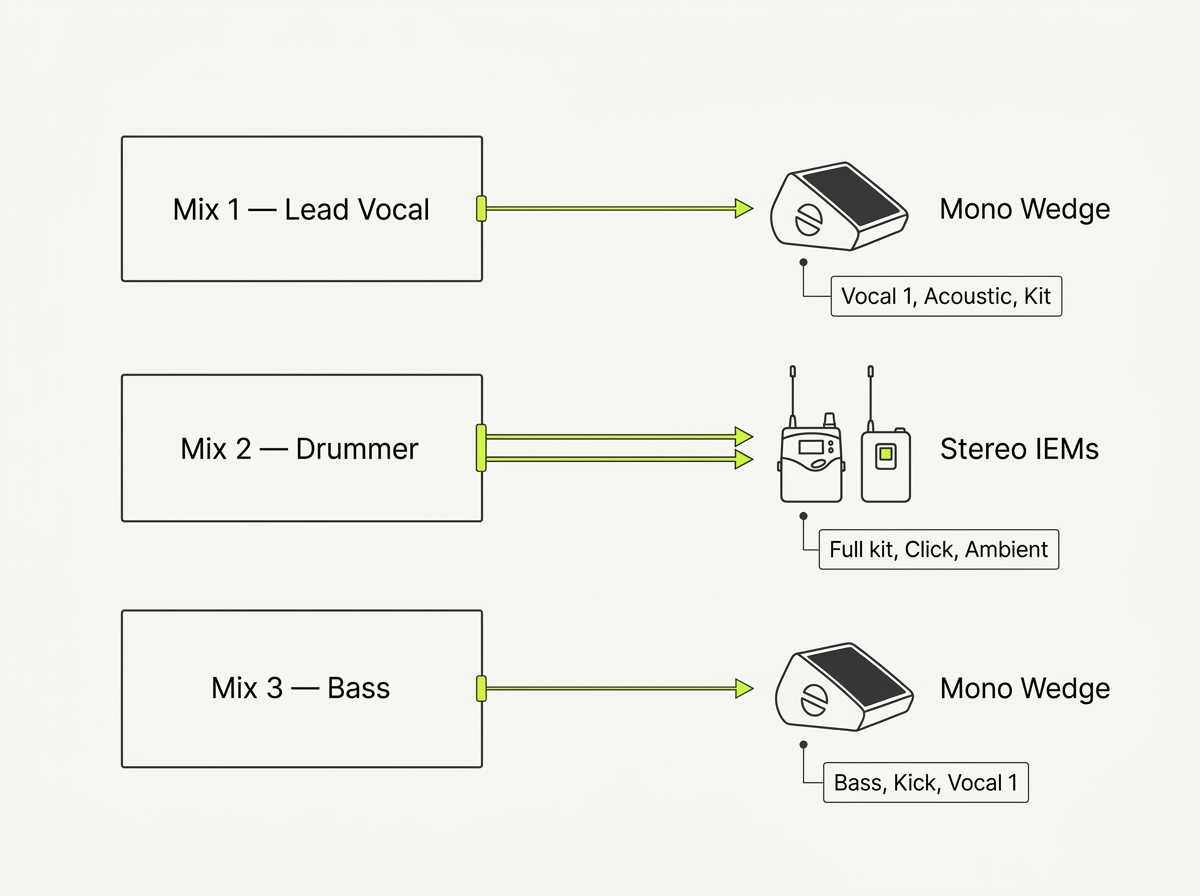
It's normal to mix both in one band: the drummer and lead vocalist on stereo IEMs, the bassist on a wedge because they want to feel the low end, the keyboard player on IEMs but fed mono. Hybrid setups are the rule, not the exception.
How many mixes do you need?
The quick rule: one mix per ear that needs its own balance. A 5-piece band on IEMs typically lands at 5–6 stereo mixes (one per member, plus sometimes a dedicated drum-sub or guest mix). The same band on all wedges might run 4–6 mono mixes — a vocal wedge for the lead, a drum wedge, a shared wedge for the rhythm section.
The force driving mix count upward is the "more me" syndrome — the near-universal fact that every performer wants their own instrument or vocal louder in their personal mix than in anyone else's. The vocalist wants more of their own mic; the bassist wants more bass; the drummer wants more click and kick. A "more me" mix is simply a mix built around that one performer, where their source sits on top. With wedges you approximate it by giving each person their own wedge; with IEMs and personal mixers you can dial it precisely — sometimes a stereo band mix on one channel paired with a dedicated mono "more me" channel for the performer's own instrument.
When you're counting mixes for the rider, count destinations, not channels: a stereo IEM pair still counts as one mix (it just consumes two aux sends on the console). Be honest about how many performers genuinely need their own balance versus who can share.
Documenting monitor mixes, step by step
A monitor mix is a small, structured record. In Techrider.live each one is part of the same connected data model as your plot and input list — change an input channel and every mix referencing it follows automatically. Here's how to build them out.
1. Start from your input list, not from scratch. Open the Rider and switch to the monitor mix view. The channels available to route into a mix are the same rows you already built in the input list — there's no second source of channel names to drift out of sync.
2. Create one mix per destination. Add a mix, then fill in the four things that define it:
| Field | What it captures | Example |
|---|---|---|
| Mix name | A short label the monitor engineer will read | "Vocal 1" |
| Destination | Wedge or IEM | IEM |
| For | Who it's for (performer / role) | Lead vocalist |
| Channels in it | Which input channels are routed into this mix | Vocal 1, Kit, Bass, Acoustic |
3. Set the destination correctly — wedge (mono) or IEM (stereo). This is the field that tells the engineer how many aux sends to allocate and what to patch. A wedge takes one aux send (mono). A stereo IEM takes two (left/right) plus a transmitter channel and a bodypack on the performer.
4. Route the channels, weighting toward "more me." For each mix, add the channels that performer needs to hear and lean their own source to the top. The drummer's mix gets the full kit plus click and an ambient mic; the lead vocalist's mix gets their own mic loudest, with the band underneath.
5. Capture RF details for IEMs. For IEM destinations, note the make/model of transmitter and bodypack if you're carrying your own, and whether you'll need the venue to provide wireless. The actual frequency coordination — scanning the room and picking interference-free channels — happens at the venue, but flagging your RF inventory in advance lets the monitor engineer plan antenna and frequency real estate before you arrive. (If your band carries its own IEM transmitters and you're publishing exact frequencies in the rider, please verify against local RF regulations and the venue's coordinator — frequencies shift by region and over time.)
, "Mix 2 — Drummer" (destination: IEM, stereo indicator visible, For: Drummer, channels: Full kit + Click + Ambient), "Mix 3 — Bass" (destination: Wedge, For: Bassist, channels: Bass, Kick, Vocal 1). Each row shows a clean editable fields layout; the IEM row is subtly highlighted with the acid-green accent to distinguish it from wedge rows; a small "linked to input list" badge sits in the corner. Neutral table UI, no clutter.)
Keeping the mix list linked to your input list
The biggest day-of error with monitor mixes is drift: the input list renumbered channel 7 from "Guitar 1" to "Guitar 2," but the monitor mixes still route channel 7 into the vocalist's wedge as if it were Guitar 1. The vocalist gets the wrong instrument in their ear at soundcheck.
This happens when the input list and the mix list live in separate documents. In Techrider.live they share one data model — each mix references the same channel rows as the input list, and each channel row knows which mixes it feeds. So when you:
- rename a channel ("Guitar 1" → "Guitar 2"), every mix containing it updates its label;
- renumber the input list, the mixes follow the new numbering;
- add a new channel (a second vocal mic), you can immediately route it into existing mixes;
- remove a channel, it drops out of any mix that referenced it.
You edit one source of truth, then export a live link (always the latest version) and a PDF (the day-of-show safety belt when festival Wi-Fi fails and the monitor engineer is reading off paper). That single-source behavior is exactly what stops the "wrong instrument in my ear" call at soundcheck.
Showing IEMs and wedges on the stage plot
The mix list tells the engineer what each mix contains; the stage plot shows where the destinations physically sit. Both belong on the rider.
- Wedges — draw them along the downstage edge, angled up at the performer they serve, and label them with the mix name ("Wedge — drummer," "Wedge — lead vocal"). One label per wedge; an engineer scanning under load needs the word, not just the shape.
- IEM bodypacks — place a bodypack marker near each performer on IEMs, labeled with the mix name ("IEM — drummer"). The transmitter lives at the console, not on stage, so it doesn't need a stage position — but the bodypack does, because that's the physical thing the performer wears.
- Antennas — if you're carrying IEM antennas (paddles or a helical), note roughly where they'll sit, since line-of-sight to the bodypacks matters for dropouts. (Whether and where to place antennas depends on your specific RF inventory and the venue — please verify with your monitor engineer.)
Because the stage plot, input list, and mix list share one data model, the mix names on the plot stay in sync with the mix rows in the table — label a wedge "Wedge — drummer" once and it matches everywhere.
FAQ
What is a monitor mix list? A monitor mix list is the part of your rider that documents each monitor mix: a name, a destination (wedge or IEM), who it's for, and which channels are routed into it. It tells the monitor engineer what each performer hears so mixes can be pre-built before soundcheck.
How many monitor mixes do I need? Roughly one mix per ear that needs its own balance. A 5-piece on IEMs typically runs 5–6 stereo mixes (one per member, sometimes plus a drum-sub). On wedges, expect 4–6 mono mixes. Count destinations, not channels — a stereo IEM pair is one mix that consumes two aux sends.
Wedges vs IEMs — which goes on a stage plot? Whichever each performer actually uses, and often both. Wedges are floor monitors (mono, drawn along the downstage edge); IEMs are earbuds fed by a bodypack + transmitter (often stereo, drawn as a bodypack marker near the performer). Hybrid bands — some on wedges, some on IEMs — are the norm. (What Is a Monitor Mix? →)
How do I show IEMs on a stage plot? Place a bodypack marker near each performer on IEMs and label it with the mix name (e.g., "IEM — drummer"). The transmitter and antennas live off-stage at the console, so they don't need a stage position, but it's worth noting roughly where any IEM antennas will sit for line-of-sight.
What is a "more me" mix? A "more me" mix is a personal monitor mix built around one performer, with their own instrument or vocal loudest under the band. It's near-universal — every musician wants more of themselves. On wedges you approximate it by giving each person their own wedge; on IEMs you can dial it precisely, sometimes running a stereo band mix alongside a dedicated mono "more me" channel for the performer's own source.
What's next
- 🎚️ What Is a Monitor Mix? — the conceptual breakdown of wedges, IEMs, and mixes.
- 📋 Build an input list / patch sheet — the channel list your mixes route from.
- 🗺️ Make your first stage plot — place the wedges and bodypacks the mix list refers to.
- 🤝 Collaborating on a Rider — invite your monitor engineer or TM to refine the mix list with you.
Further reading
- Hybrid Monitor Mixing: Approaches When Using IEMs & Wedges Together — ProSoundWeb
- The Ultimate Guide to In-Ear Monitors — RF Venue
- Selection and Operation of Personal Monitor Systems — Shure (PDF)
- Wrangling Wireless: A Field-Tested RF Coordination Method — ProSoundWeb
Last updated: 2026-07-07 · Reviewed by the Techrider.live team · Tested against real festival and club stage plots.
Related guides
How to Make a Stage Plot for Your Band (5-Minute Guide)
A 5-step walkthrough to make a clean, engineer-readable stage plot for your band — set the stage, place performers, add gear and mics, then export a PDF and share link.
9 min readTutorialsFree Stage Plot Template (Download + How to Use)
A stage plot template is a pre-laid-out starting point for your band's stage map. Pick one of four shapes, customize performers and gear, and export a PDF.
9 min readTutorialsHow to Build an Input List / Patch Sheet (with Template)
A channel-by-channel table of every source on stage. Learn the input list columns, the drums-to-vocals ordering, 48V and DI rules, and how a patch sheet differs.
7 min read