What Is a Monitor Mix? Wedges, IEMs & Mixes Explained
9 min read · Updated July 7, 2026 · new bands, artists new to live sound
A monitor mix is the dedicated feed a performer hears on stage — through a wedge or in-ear monitors. Learn what it is, why everyone needs their own, wedges vs IEMs, the 'more me' mix, and where it fits in your rider.
TL;DR — A monitor mix is the dedicated audio feed a performer hears on stage, sent to a wedge (a floor speaker) or in-ear monitors (IEMs). It exists because what the audience hears out front — the FOH mix — is not what the band hears standing behind the PA. Every performer typically wants their own balance, often with more of their own instrument or vocal — the famous "more me" mix. The monitor mix list is part of your technical rider, alongside the stage plot and input list.
Table of contents
- What is a monitor mix?
- Wedges vs IEMs
- Why everyone needs their own mix ("more me")
- How many mixes do you need?
- Where monitor mixes fit in your rider
- FAQ
What is a monitor mix?
A monitor mix is a dedicated mix sent to a performer so they can hear themselves and the rest of the band on stage. It's built at the console and routed to one place: either a wedge on the floor in front of them, or a pair of in-ear monitors (IEMs) they're wearing.
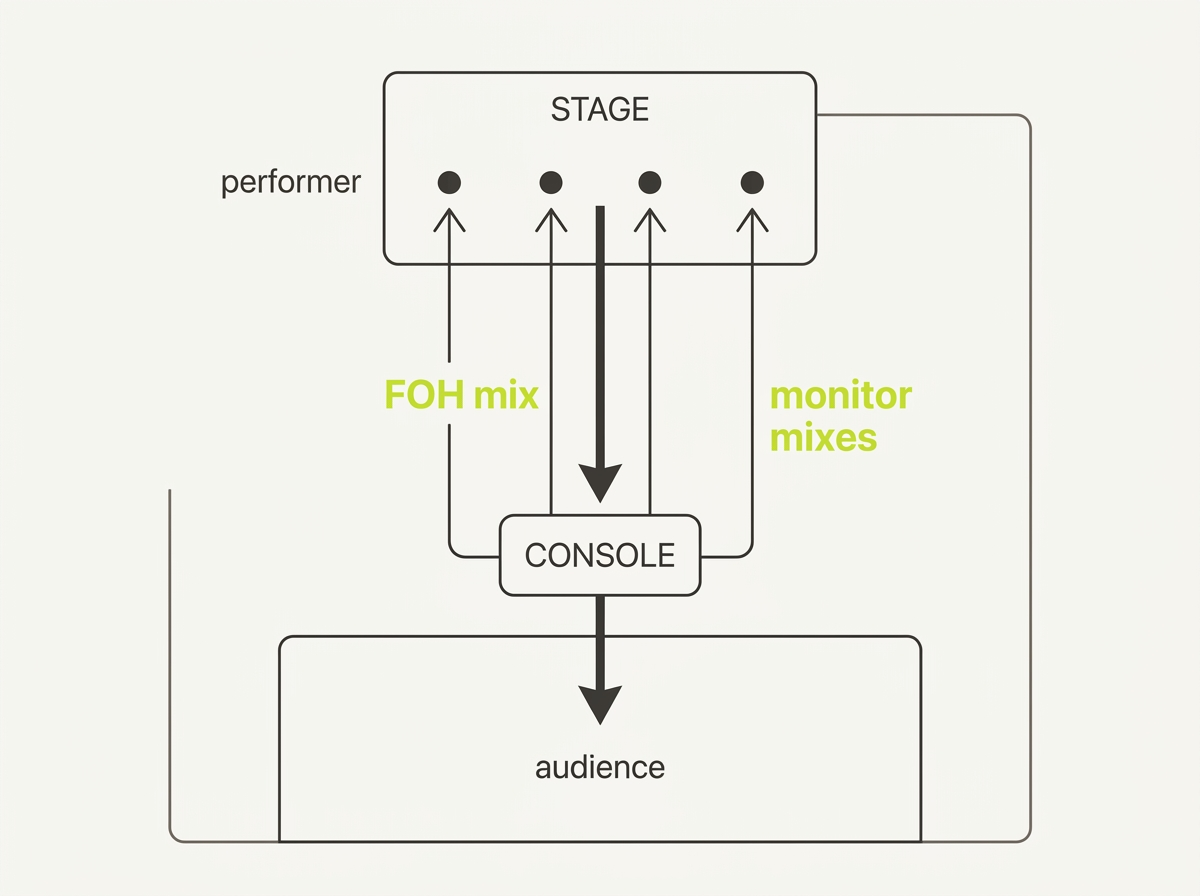
Why it has to exist at all is the part that surprises new bands. The mix the audience hears — the front-of-house (FOH) mix — is balanced for the room, thrown out of the main PA, and is not what anyone on stage hears. Stand behind the PA stacks and the picture collapses: the vocalist can't hear their own voice over the guitar amp, the drummer can't hear the bass, no one can tell if they're in tune or in time. The stage is a different acoustic world than the house.
So live sound runs two mixes in parallel:
- The FOH mix — what the audience hears, mixed by the FOH engineer at the desk out front.
- The monitor mix(es) — what the performers hear, mixed by a monitor engineer at a separate console on the side of the stage (or, on smaller gigs, by the same engineer from FOH).
Each monitor mix is its own balance. The lead vocalist's mix has their vocal loudest with the band underneath; the drummer's mix has the full kit plus a click; the bassist might want kick and bass on top. One song, one stage — but several personal mixes coming out of the same console at the same time.
Wedges vs IEMs
Every monitor mix has a destination — the physical thing that turns the mix into sound the performer hears. There are two:
- Wedge (stage monitor) — a floor speaker angled up at the performer. Mono, adds to stage volume, and bleeds into nearby mics and the room — but lets the performer physically "feel" the sound and stay connected to the audience. Common for drums, bass, and vocalists who move around.
- IEM (in-ear monitor) — earbuds driven by a small bodypack receiver the performer wears, which picks up a wireless signal from a transmitter at the console. Usually stereo, isolates the performer from stage noise (and protects hearing), and delivers a consistent mix regardless of the room. The trade-off: needs a sealed fit, often an ambient mic or two to avoid feeling closed in, and RF coordination so it doesn't clash with other wireless gear.
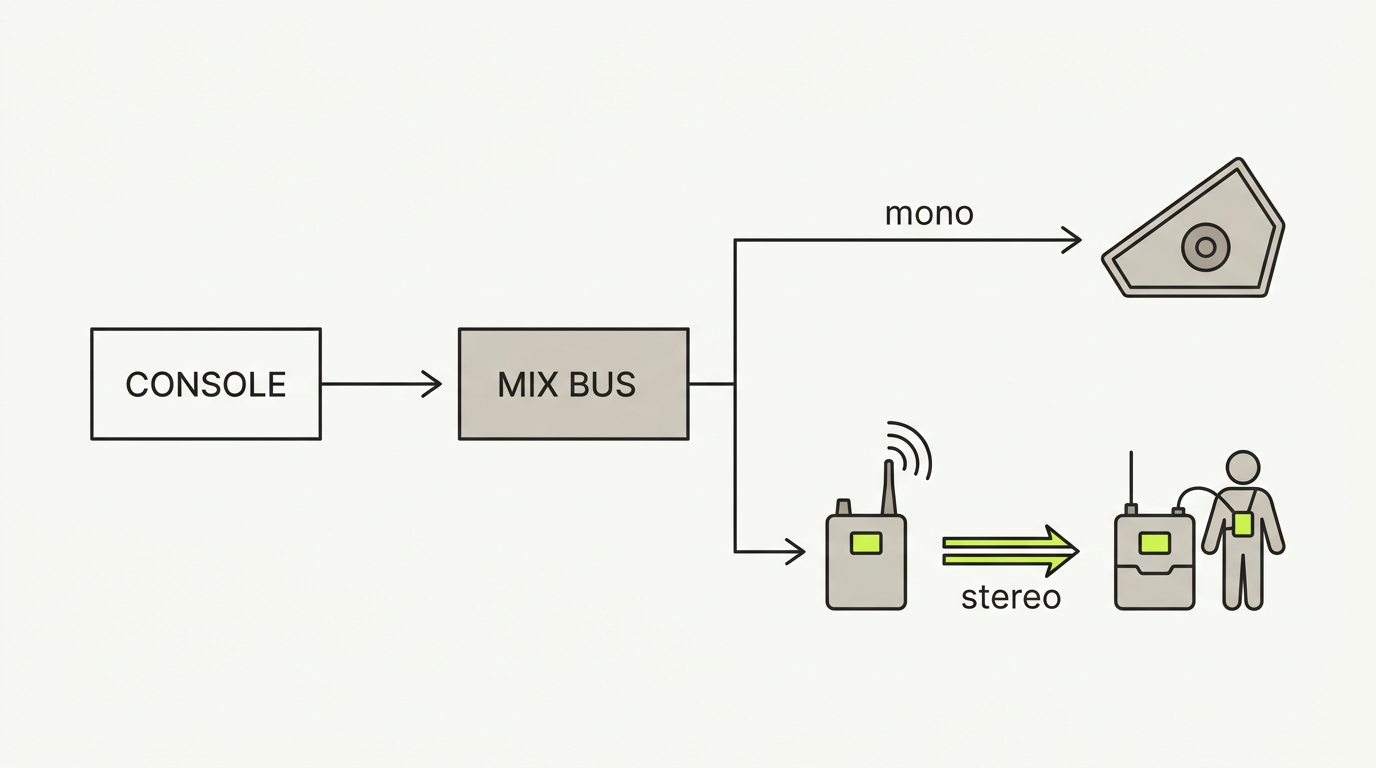
It's normal to mix both in one band — and that's not a compromise, it's a choice. A drummer and lead vocalist on stereo IEMs for detail and hearing protection, the bassist on a wedge because they want to feel the low end, the keyboard player on IEMs but fed mono. Hybrid setups are the rule, not the exception.
| Wedge | IEM | |
|---|---|---|
| What it is | Floor speaker angled at performer | Earbuds from a bodypack + wireless transmitter |
| Channels | Mono | Often stereo (can run mono) |
| Stage volume | Adds to it | Reduces it sharply |
| Isolation | None — bleeds into mics/room | Strong — protects hearing, isolates from room |
| Mobility | Stand in the sweet spot | Move anywhere |
| Best for | Low-end "feel," drums, bass, vocalists who move | Vocals, keys, detailed mixes, consistent night-to-night |
Why everyone needs their own mix ("more me")
Give a band one shared monitor mix and within minutes someone will say the four words every monitor engineer knows by heart: "Can I get more me?"
"More me" is live-sound slang for a performer wanting more of their own instrument or vocal in their personal mix. The vocalist wants their mic loudest; the bassist wants more bass; the drummer wants more click and kick. It's so universal that Shure has called it the "More-Me Syndrome." It's not ego — it's that to play in time and in tune, a musician has to hear themselves clearly against the rest of the band, and "the rest of the band" is exactly what's competing for space on a loud stage.
A "more me" mix is simply a personal mix built around one performer, with their own source sitting on top. The practical consequence: on a real stage, almost no one shares. Each person gets their own balance, and the number of mixes grows roughly with the number of performers.
How performers get there depends on the gear:
- With wedges, you approximate "more me" by giving each person their own wedge and tailoring what's in it.
- With IEMs and personal mixers, you can dial it precisely — sometimes running a stereo band mix on one channel alongside a dedicated "more me" channel for the performer's own source.
Either way, the takeaway for a band planning their rider is the same: assume one mix per person who needs their own balance, not one mix for the whole stage.
How many mixes do you need?
A rough guide, by band size and monitoring approach:
| Band | On wedges (mono mixes) | On IEMs (often stereo mixes) |
|---|---|---|
| Acoustic duo | 1–2 | 1–2 stereo |
| 3–4 piece | 3–4 | 3–4 stereo |
| 5-piece | 4–6 | 5–6 stereo (sometimes + a drum-sub) |
The quick rule: one mix per ear that needs its own balance. Count destinations, not channels — a stereo IEM pair is still one mix that happens to consume two aux sends on the console. And be honest about who genuinely needs their own balance versus who can share. A backing vocalist who stands next to the lead may be fine on a shared wedge; the drummer almost never is.
Where monitor mixes fit in your rider
If the stage plot shows where things go and the input list shows what each channel carries, the monitor mix list shows what each performer hears. Together they make up the meat of a technical rider — the package a band sends to a venue so the crew can prep before load-in.
A monitor mix list captures, for each mix:
- A mix name the monitor engineer will read ("Vocal 1," "Drummer").
- A destination — wedge or IEM.
- Who it's for — which performer or role.
- Which channels are routed in — drawn from your input list.
Documenting this before soundcheck is what turns the first ten minutes from a scramble into a confirmation: the monitor engineer can pre-patch aux sends, pre-position wedges, and pre-coordinate IEM frequencies. Leave it off the rider and you'll discover at soundcheck that wedges are pointing the wrong way and the drummer has no click.
For the step-by-step on building that list in your rider — wedge vs IEM destinations, routing channels, keeping it synced to your input list — see the companion tutorial: Configuring Monitor Mixes & IEMs.
FAQ
What is a monitor mix? A monitor mix is the dedicated audio feed a performer hears on stage, sent to a wedge or in-ear monitors. It's separate from the FOH mix the audience hears, because standing behind the PA you can't hear the house balance at all.
What is the difference between wedges and IEMs? A wedge is a floor speaker angled up at the performer — mono, adds stage volume, lets you "feel" the sound. An IEM (in-ear monitor) is a pair of earbuds fed wirelessly from a transmitter at the console to a bodypack the performer wears — usually stereo, isolates you from stage noise, and protects hearing. Many bands use both.
What does "more me" mean in live sound? "More me" is a performer asking for more of their own instrument or vocal in their personal monitor mix. It's near-universal — every musician needs to hear themselves clearly to play in time and in tune — and it's why most performers end up with their own mix rather than a shared one.
Do I need monitors for a small gig? Yes. Even a 30-minute set at a small venue goes better when you can hear yourself. It doesn't have to be elaborate — a single vocal wedge or a basic set of IEMs is enough. The point is you need some way to hear your own voice and the band over the room.
What is a monitor engineer? A monitor engineer is the person who mixes what the performers hear on stage — wedges and IEMs — usually from a separate console at the side of the stage. The FOH (front-of-house) engineer is a different role: they mix what the audience hears out front. On smaller gigs one person may do both from FOH.
What's next
- 🎚️ Configuring Monitor Mixes & IEMs — turn these concepts into a mix list in your rider.
- 📋 Build an input list / patch sheet — the channel list your mixes route from.
- 🗺️ What Is a Tech Rider? — where the monitor mix list sits in the bigger document.
Further reading
- In-Ear Monitors vs. Wedges — Ultimate Ears Pro
- Stage Monitor System — Wikipedia
- In-Ear Monitoring: Why Use Personal Monitor Systems? — Shure
Last updated: 2026-07-07 · Reviewed by the Techrider.live team · Tested against real festival and club stage plots.
Related guides
What Is a Stage Plot? (And How to Read One)
A stage plot is a top-down map of your band's stage setup. Learn what goes on it, how it differs from an input list and tech rider, and what makes one engineer-readable.
6 min readBasicsWhat Is a Tech Rider? (Sections Explained)
A tech rider is the full technical package a band sends a venue — console, monitors, PA, backline, power, stage plot, input list, hospitality. Learn every section.
7 min readBasicsStage Plot Symbols & Legend Explained
A visual glossary of stage plot symbols — mics, DI boxes, wedges, IEM packs, drums, amps, keys, power drops. Learn what each icon means and how to read any stage plot.
7 min read