Stage Plot Symbols & Legend Explained
7 min read · Updated July 7, 2026 · new bands, venue techs
A visual glossary of stage plot symbols — mics, DI boxes, wedges, IEM packs, drums, amps, keys, power drops. Learn what each icon means and how to read any stage plot.
TL;DR — Stage plot symbols are the icons that stand for each mic, DI box, monitor, instrument, and power drop on a stage map. Because there's no universal standard, every plot should carry a small legend — a key that explains what each icon means. This glossary covers the symbols you'll see most often and shows you how to read any plot fast.
Use the library: Browse all 221 production icons and export your own legend with the free Stage Plot Symbol Library. No login required.
Why stage plot symbols matter
A stage plot gets read under pressure. Between load-in and doors, the local crew has to run cable, place wedges, set backline, and patch every channel — often for a band they've never met. In that window, icons do the heavy lifting: a triangle near the singer means "wedge here," a "DI" box near the bassist means "line-level input here."
The catch: there's no universal standard for stage plot symbols. A wedge might be a triangle on one plot and a small speaker on another; power might be a lightning bolt, an outlet, or the letters "AC." So two things matter more than the icons themselves:
- A consistent legend on every plot, so a mic always means a mic.
- Labels on the items — channel numbers and names tying each icon back to the input list.
New to stage plots? Start with What Is a Stage Plot?, then come back here.
The common stage plot symbols (a visual glossary)
These are the icons you'll meet on almost any working plot, grouped by what they do.
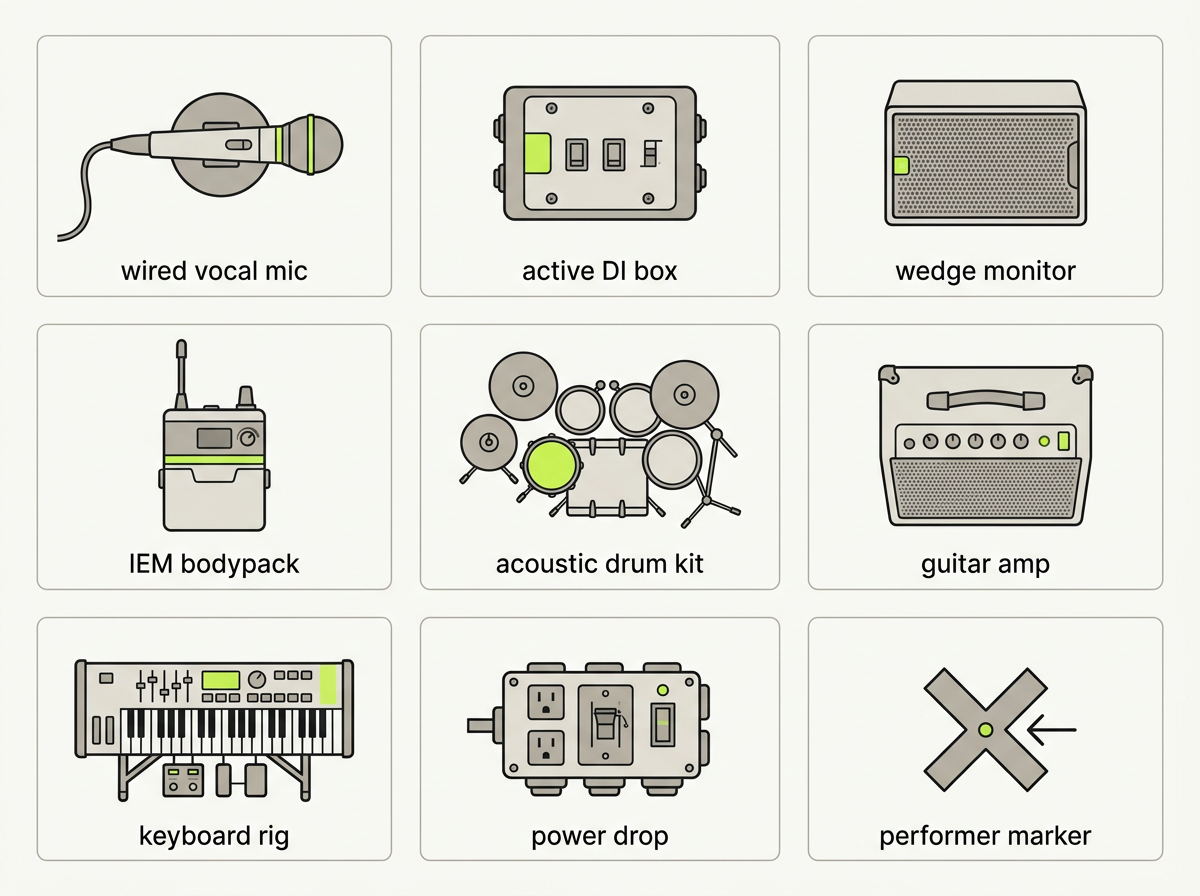 Fig. 1 — A legend card grid of common stage plot symbols.
Microphones
- Vocal mic (wired) — a small circle with a stem, or a stylized mic outline. A stand-mounted mic running to the snake.
- Wireless handheld — same outline, often with an antenna dot or "TX" badge. A wireless receiver output.
- Condenser mic — sometimes marked "48V" or "+48" to flag phantom power.
- Clip-on / instrument mic — a small mic clamped to a drum rim or horn bell.
DI boxes
A DI (Direct Injection, or Direct Box) is the symbol you'll see most near bass, acoustic guitar, keys, or laptop rigs. It converts an instrument-level signal to a mic-level signal the console can take. The icon is almost always a small square labeled "DI" — one of the few genuinely standard conventions on stage plots. Variants:
- Passive DI — no power needed (bass, acoustic with pickup).
- Active DI — needs power, often via phantom or a battery (some keys, piezo pickups).
- Stereo DI — two channels, "DI L" and "DI R" (keys, laptop, DJ rig).
Monitors — wedges and IEMs
- Wedge (floor monitor) — most often a triangle pointing at the performer; the point faces the musician it serves.
- IEM bodypack — a small rectangle marked "IEM" (sometimes an ear icon). The player is on in-ears and needs the matching transmitter channel, not a wedge.
- Drum fill / side fill — a larger wedge or speaker near the drum riser or stage edge.
For mixing or building these into your plot, see Configuring Monitor Mixes & IEMs.
Drums, amps, and keys
- Drum kit — usually one composite icon labeled "Drums" or "DK," sometimes broken into kick, snare, toms, hi-hat, cymbals, and an overhead pair. Drum channels drive most of your input count — a compact kit might be 5, a fully mic'd kit 12+.
- Guitar / bass amp — a rectangular cabinet, often with a head on top, labeled "GTR," "BASS," or "Keys." Bass rigs usually appear plus a DI, since most venues take bass via DI alongside (or instead of) a cab mic.
- Keyboards — a flat keyboard silhouette or labeled rectangle, often feeding a stereo DI (L/R). A laptop or playback rig shows as a small monitor into a stereo DI.
Power drops
Power is where symbols drift the most. Look for a lightning bolt, an outlet/socket icon, or the letters "AC" / "POW." Good plots note how many drops and which gear they feed — backline often wants its own circuit away from audio.
Performer markers and stage directions
People appear as simple circles or ovals labeled by role — "Vox," "Gtr," "Bass," "Drums," "Keys." Best practice (echoed across the livesound community) is to avoid cartoon drawings of people — they add noise and read poorly when the plot shrinks to PDF.
Every plot should also mark Stage Left / Stage Right from the performer's perspective, plus the audience direction arrow. These aren't gear symbols, but they anchor the legend — without them, left and right are ambiguous. (Full breakdown → Stage Left vs Stage Right.)
How to read a stage plot
Once the symbols click, reading a plot is a four-step scan:
- Find the orientation — stage left/right and the audience arrow tell you which way you're looking.
- Locate the performers — each marker sets your reference points.
- Walk the inputs — from each performer, look outward to their mics, DIs, and amps; each maps to a channel on the input list.
- Check monitors and power — note where wedges, IEM packs, and power drops land.
The plot tells you where; the input list tells you what each channel is and how it's patched. Channel numbers on the plot should match channel rows on the table.
Why a consistent legend is worth it
When the same icon means the same thing everywhere, an engineer doesn't decode your plot — they just read it. That's the difference between a smooth changeover and a confused one. It's also why Techrider.live uses a controlled, consistent icon library: every item — mic, DI, wedge, drum kit, amp, power drop — comes from one canonical set, so a mic always looks like a mic on every plot you export. That library stays in sync with your input list and monitor mixes too — change an item on the plot and its channel updates with it, so your symbols and channel table never drift apart.
FAQ
What do stage plot symbols mean? Icons that represent each piece of gear and each performer on stage — mics, DI boxes, monitors, instruments, amps, and power drops. Since there's no universal standard, every plot should include a legend.
What does "DI" mean on a stage plot? DI stands for Direct Injection (or Direct Box). It converts an instrument-level signal (bass, acoustic guitar, keys, laptop) to a mic-level signal the console can accept. On a plot it's usually a small square labeled "DI."
How do I read a stage plot? Find the orientation first (stage left/right and audience direction), then the performers, then the inputs around each performer, and finally the monitors and power. Match symbols to your input list using the channel numbers. (See How to Make a Stage Plot →)
Is there a standard for stage plot symbols? Not a single universal one. Some are fairly consistent (DI as a labeled box, a wedge as a triangle), but most vary by tool. The fix: include a legend, and label items with channel numbers.
What is a stage plot legend? A small key — usually in a corner of the plot — explaining what each symbol means. It's what an engineer uses to decode your plot quickly at load-in.
What's next
- 🗺️ What is a stage plot? (anatomy + examples)
- ↔️ Stage left vs stage right (and stage directions)
- 🛠️ How to make a stage plot for your band (5-minute guide)
Further reading
- Understanding Stage Plot & Input List — NLFX Pro
- Stage Plot For Bands, with Examples — DIY Musician (CD Baby)
- Stageplotting — This Tour Life LLC
Last updated: 2026-07-07 · Reviewed by the Techrider.live team · Tested against real festival and club stage plots.
Related guides
What Is a Stage Plot? (And How to Read One)
A stage plot is a top-down map of your band's stage setup. Learn what goes on it, how it differs from an input list and tech rider, and what makes one engineer-readable.
6 min readBasicsWhat Is a Tech Rider? (Sections Explained)
A tech rider is the full technical package a band sends a venue — console, monitors, PA, backline, power, stage plot, input list, hospitality. Learn every section.
7 min readBasicsStage Left vs Stage Right (and Stage Directions Explained)
Stage left and stage right are from the performer's perspective facing the audience — which is the mirror of what the audience sees. A clear, memorable explainer of stage directions, house left/right, and upstage/downstage.
7 min read