Why Your Tech Rider Should Be a Living Document
12 min read · Updated July 7, 2026 · bands, engineers, PMs, TMs
A tech rider shouldn't be a frozen PDF re-emailed per gig. The case for treating it as a living, single-source-of-truth document: live link beats re-sending, async collaboration lets the right person edit, and rider reuse stops version drift.
TL;DR — A living tech rider is one connected source of truth, not a frozen PDF re-emailed per gig. The frozen-PDF workflow produces version drift —
v3_FINAL_really_final.pdf, three copies at load-in, nobody sure which is real. The fix comes in three stages: a live link that's always current, async multi-editor collaboration so the right person can edit the same source, and rider reuse so you stop re-dating files. Real-time simultaneous editing and live presence are on the roadmap, not shipping yet.
Table of contents
- The frozen-PDF problem
- What "living document" means for a rider
- The three stages, from static to collaborative
- Why a live link beats re-emailing a PDF
- Letting the right person edit (async collaboration)
- Reusing one rider instead of re-dating files
- FAQ
The frozen-PDF problem
For most of the live-music industry, a tech rider is still a PDF — and a PDF is a frozen document. The moment you export one, it starts going stale. The drummer swaps a snare mic, the vocalist moves to IEMs, a keyboard DI gets added — and the file you already emailed to the venue no longer matches reality. So you edit, re-export, and send it again. And again. By the end of a short tour, the paper trail looks like this:
Rider_Oct_Berlin.pdf
Rider_Oct_Berlin_FINAL.pdf
Rider_Oct_Berlin_FINAL2.pdf
Rider_Oct_Berlin_revised_ACTUAL.pdf
Rider_Nov_London.pdf
...
This is version drift, and it's not a tech-rider quirk — it's the universal failure mode of any document managed by filename. It even has a name in documentation and design circles: the "final_final" file-naming culture, where people invent ad-hoc version control through filenames because the system doesn't make the latest version obvious. (Technical Writer HQ, Frontify).
Three things go wrong, every time:
- Nobody knows which copy is real. At load-in there are often two or three versions in circulation — the one the promoter has, the one the engineer printed, the one the TM emailed last night. The production industry's own checklist writers flag this directly: "File confusion creates chaos faster than missed transitions." (AVT Productions).
- Channel mismatches reach the stage. When the printed plot and the link the engineer is reading on their phone disagree, the patch is wrong at soundcheck — the single most expensive moment to discover it.
- Updating is manual and lossy. A change made to this copy has to be re-applied to every other copy, and one always gets missed. Email previews can even cache a stale version of the attachment, so the recipient genuinely downloads an older file than the one you sent. (Adobe Community).
The deeper issue is structural, not behavioral. A PDF has no concept of "the current version" — only the version you happened to email last. The fix isn't better filename discipline. It's a different kind of document.
What "living document" means for a rider
A living tech rider is a document that has one canonical state, changes over time, and tells you who changed what. Three properties define it:
- Single source of truth. There's one Rider, not N copies. The stage plot, input list, monitor mixes, power notes, and backline aren't separate files glued together — they're one connected data model, so editing the channel count updates the plot and the mixes together. On Techrider.live, that's how a Rider is built by default. (See What Is a Tech Rider?.)
- Always current by default. Anyone who opens the document sees the latest save — not "the version from Tuesday." A live link points at the current state of the Rider, so the venue, the engineer, and the TM are all looking at the same thing.
- Attributed change. Every edit is attached to a signed-in editor with a timestamp and a summary, visible in a history view you can roll back. This is what turns "version control" from a buzzword into something you can trust on a 30-date run.
A frozen PDF has none of these. It has a filename and a timestamp, and the rest is hope. The argument of this article is simple: the document that production teams actually rely on — the one patched from, printed, emailed, and argued over at load-in — should be the living one. The frozen PDF is still useful, but as a snapshot of the living document, not as the document itself.
The three stages, from static to collaborative
The move from frozen PDF to living document doesn't happen in one leap. It happens in three stages, and each stage removes a specific kind of drift.
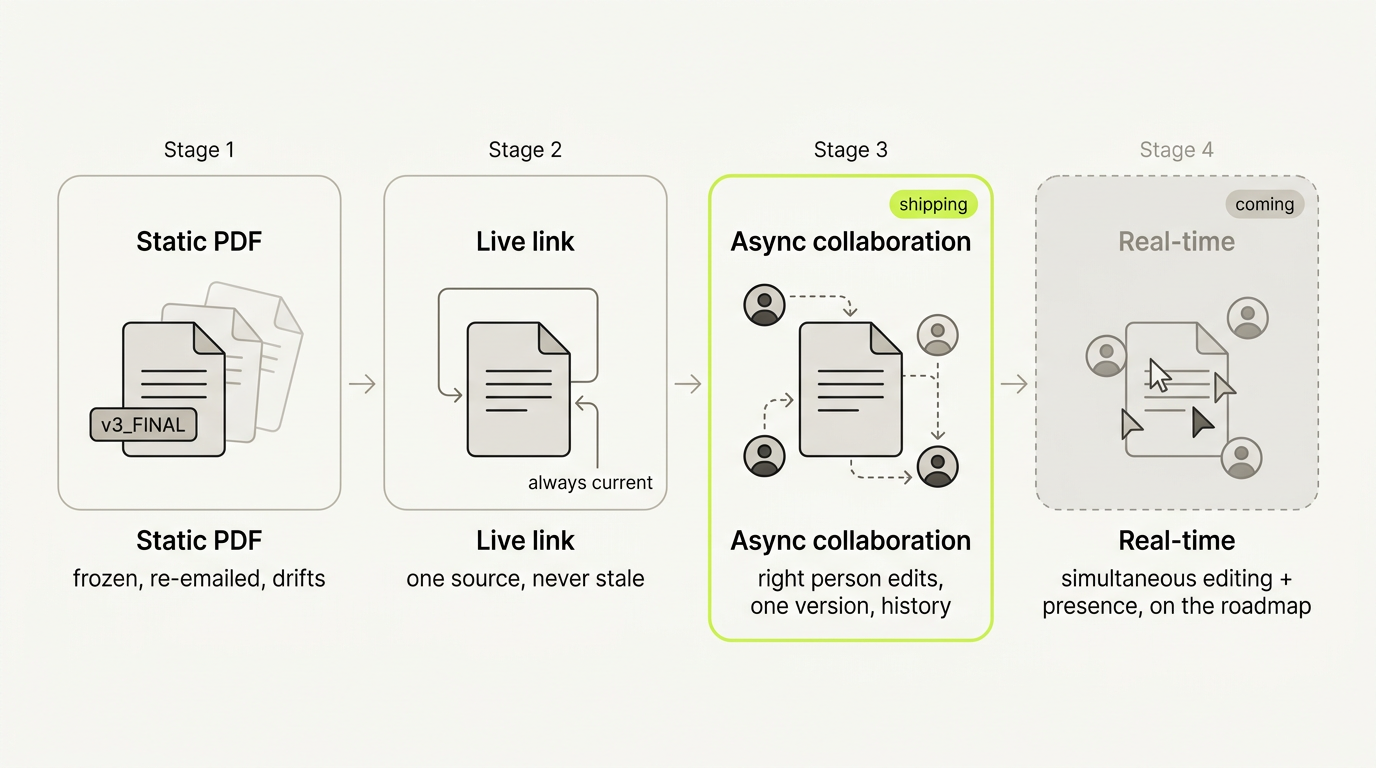
Read it as a progression of what each stage eliminates:
- Static PDF (frozen, re-emailed) — the baseline. Drift is baked in; "the latest version" is a social convention enforced by filenames and email threads. Eliminates nothing.
- Live link (always current) — one URL resolves to the latest save, so there is no "old copy" to confuse anyone. Eliminates staleness drift.
- Async multi-editor collaboration (right person edits, one source, full history) — the few people who actually need to change the rider edit the same source, with every change attributed. Eliminates copy drift — there are no parallel copies diverging.
- Real-time collaboration (simultaneous editing + live presence) — on the roadmap, not shipping today. Would remove the turn-based handoff delay. Until it ships, stage 3 already covers the workflow most productions need.
The important boundary: stages 1–3 are how a rider can work today. Stage 4 is what's coming. Treating real-time co-editing as already available is one of the fastest ways to set up disappointment at load-in, so we're explicit about it throughout this article.
Why a live link beats re-emailing a PDF
The first jump — static PDF to live link — does most of the work, because most drift is just staleness.
A live link is a URL that always points at the current saved version of your Rider. When you fix a channel, the next person who opens the link sees the fix. You don't re-send anything. The promoter doesn't have to guess whether the email titled "Rider (3).pdf" supersedes "Rider (2).pdf." There is one place to look.
That doesn't make the PDF obsolete — it changes the PDF's job. The PDF becomes a festival and paper fallback: re-exported on demand for bad networks, crews who want paper at front-of-house, and archives that demand a file. The link and the PDF are generated from the same source Rider, so they can't disagree. Send the link as the source of truth; export a dated PDF when a specific gig needs paper. (Full breakdown: Sharing & Collaborating on a Rider: Link, PDF, Feedback.)
The contrast with the frozen-PDF workflow is stark:
| Frozen PDF, re-emailed | Live link (same source) | |
|---|---|---|
| Latest version | Whatever was emailed last | Always the current save |
| After a change | Re-export, re-send, hope they use the new one | Link updates itself |
| At load-in | Risk of two or three versions in circulation | Everyone reads the same URL |
| Offline / paper | Yes (its only real strength) | No — pair it with a dated PDF |
The PDF still earns its place. It just stops being the document and becomes a snapshot of the document.
Letting the right person edit (async collaboration)
A live link solves staleness, but it leaves one gap: who's allowed to change the rider? If the answer is "nobody but the owner, and everyone else emails change requests," you've re-created the email-chain problem with extra steps.
On Techrider.live, the Rider owner can invite up to 3 collaborators by email — typically the FOH or monitor engineer and the TM — to open, edit, save, export, and inspect history on the same Rider. This is asynchronous multi-editor collaboration: one person edits and saves, then the next opens the same Rider and picks up where the first left off. Turn-based, on one canonical version.
Be precise about what this is and isn't:
- It is multi-editor collaboration on a single source. The engineer renumbers channels, the TM adds a backline note, the vocalist confirms positions after rehearsal — all on one Rider, every save attributed in the history view.
- It is not real-time simultaneous editing. There are no live cursors, no presence indicator showing who's online. That's on the roadmap, not shipping today. If you came looking for Google-Docs-style live co-editing, that is explicitly a coming feature.
Why asynchronous turns out to be enough for most productions: a rider doesn't change every minute. It changes in discrete, deliberate edits — after rehearsal, after the first show, before the next load-in. The async handoff matches that rhythm exactly, and it preserves the property that matters most: at any given moment there is exactly one current version, and you can see who last touched it. That's what kills copy drift.
The full invite-and-edit workflow — how to add an editor, how the turn-based handoff works in practice, how to read the history view to see who changed what — lives in Collaborating on a Rider: Invite Your Engineer or TM.
Reusing one rider instead of re-dating files
There's a third kind of drift, and it's the sneakiest: the per-gig-file trap. It kicks in the moment you start a tour. The instinct is to copy last week's rider, redate it for the new venue, rename the file to keep them straight, and edit in place. A few gigs in, you have a folder of near-duplicate files and no memory of which fix made it back into the master.
The root cause is conceptual, not technical: you've stamped show-level details (date, venue) onto a stable core (the band, its instruments, its channel count). The core doesn't change show to show; the show details do. Freezing the core inside a venue-specific copy forces every future edit to be made across N files.
Techrider.live is built around the fix: dates and venues are not hard-coded into the Rider's core config. One Rider — performers, instruments, channel list, mixes, plot, power — is associated with one or more shows, rather than duplicated per gig. Edit the core once and every show using that Rider picks it up. The live link your next venue opens already reflects the change.
This is what makes the document genuinely living rather than just "stored in the cloud": you're maintaining one source and associating it with N shows, not maintaining N documents. The full reuse workflow — when to edit the core vs. when to add a per-show note, how the Rider-to-show association works, why this beats templates — is in Reusing One Rider Across Multiple Shows.
Put the three stages together and the promise of a living tech rider is concrete: one source, always current, edited by the right people, reused across the tour — with a PDF snapshot whenever a gig needs paper. That's the opposite of v3_FINAL_really_final.pdf, and it's available today. Real-time co-editing and presence are the next step, on the roadmap.
FAQ
How do I keep my tech rider up to date? Stop emailing frozen PDFs and treat the rider as one living source. Edit a single Rider, share a live link that always resolves to the current save, and export a fresh PDF only when a gig needs paper. Invite the people who genuinely change the rider (your engineer, your TM) as editors on that same source so updates happen in one place, not across copies.
What is version control for a tech rider? It's the practice of maintaining one canonical rider with a visible history of changes — instead of versioning by filename. A living tech rider gives you both: a single current state (the live link) and an attributed history (each save tied to a signed-in editor, restorable). You stop asking "which file is the latest?" because there is only one latest.
How do I manage tech rider versions? Use one Rider as the source of truth and let the link carry "current." Don't copy a file per show; associate each show with the same Rider so the reusable core is edited once. Rely on the history view — not filenames — to answer "what changed and when." Re-export a dated PDF as a snapshot for any gig that needs paper.
Should I update my tech rider between shows? Yes — but selectively. If a change is about the band itself (new instrument, new monitor setup, a mic swap), edit the core Rider once and let it propagate to every associated show. If it's about one room (house console, local backline, festival patch), put it in a per-show note rather than baking it into the core. This keeps the core stable and the per-show details where they belong.
How do I avoid tech rider version confusion? Never have more than one "current" copy. Share a single live link instead of emailing PDFs; give edit access only to the few people who need it (≤ 3 invited collaborators); and use the history view to see who changed what, so disagreements resolve by looking at the source rather than comparing filenames. Keep the PDF as a dated snapshot for offline use, not as a parallel document.
What's next
- 👥 Collaborating on a Rider: Invite Your Engineer or TM — the deep dive on async multi-editor collaboration, the invite workflow, and the history view
- 🔄 Reusing One Rider Across Multiple Shows — how Rider-first, date-agnostic reuse kills the per-gig-file trap
- 🔗 Sharing & Collaborating on a Rider: Link, PDF, Feedback — view-only link vs. feedback vs. edit access vs. PDF, and when to use each
- 📄 What Is a Tech Rider? — the parts of a rider and what each is for
Further reading
- Document Version Control — Technical Writer HQ — on the "final_final" file-naming culture and why it happens
- Guide to Tech Riders and Stage Plots for Shows and Tours — Off Trail Studios — recommends combining rider and plot into one file with a version number and date in the header
- The "Necessary Evil" Of Paperwork: Rider & Stage Plot Clarity Can Really Pay Off — ProSoundWeb — on how a rider gets refined over a tour rather than regenerated per date
Last updated: 2026-07-07 · Reviewed by the Techrider.live team · Concepts tested against real festival, club, and touring productions.
Related guides
What Is a Stage Plot? (And How to Read One)
A stage plot is a top-down map of your band's stage setup. Learn what goes on it, how it differs from an input list and tech rider, and what makes one engineer-readable.
6 min readBasicsWhat Is a Tech Rider? (Sections Explained)
A tech rider is the full technical package a band sends a venue — console, monitors, PA, backline, power, stage plot, input list, hospitality. Learn every section.
7 min readBasicsStage Plot Symbols & Legend Explained
A visual glossary of stage plot symbols — mics, DI boxes, wedges, IEM packs, drums, amps, keys, power drops. Learn what each icon means and how to read any stage plot.
7 min read