Reusing One Rider Across Multiple Shows
10 min read · Updated July 7, 2026 · touring bands, PMs, TMs
Stop copying and redating your tech rider for every gig. Learn the Rider-first, date-agnostic reuse model: one canonical setup reused across a tour, per-show association, and a live link that's always the latest version.
TL;DR — You don't need a new tech rider for every gig. On Techrider.live, the core Rider — instruments, channels, mixes, plot, and power — is not date- or venue-bound, so one Rider is reused across the whole tour. A show/gig is associated with that Rider rather than duplicating the setup. Change the core once and every show using the Rider benefits; the live link is always the latest version, so you stop emailing
v3_FINAL_really_final.pdfto every venue.
Most bands learn this lesson the hard way. Somewhere between the second and tenth gig of a tour, the "tech rider" folder on someone's laptop looks like this:
Rider_Oct_Berlin.docx
Rider_Oct_Berlin_FINAL.docx
Rider_Oct_Berlin_FINAL2.docx
Rider_Oct_Paris.docx
Rider_Nov_London.docx
Rider_Nov_London_revised.pdf
... (and 40 more)
Each file started as a copy of the last, redated for the new show, renamed to keep the venue straight, then edited in place — a different vocal mic here, a borrowed backline there, a last-minute monitor swap. By month two, nobody remembers which file went to which venue, whether the Paris change made it back into the master, or whether the engineer received the version with the IEM fix or the one before it. This is the per-gig-file trap: copy → redate → rename → drift. It scales badly, and it breaks exactly when the tour gets busy.
This walkthrough shows a different model — the Rider-first, date-agnostic reuse workflow built into Techrider.live — and why it removes the trap without making you relearn anything. For the underlying concept, see Why Your Tech Rider Should Be a Living Document.
Table of contents
- Why a rider shouldn't be date-stamped
- The Rider-first reuse model
- How to reuse one rider, step by step
- Keeping it current on the road
- Templates vs a reusable rider
- FAQ
Why a rider shouldn't be date-stamped
The core of a tech rider is stable. Your band is the same four people, with the same instruments, roughly the same channel count, the same monitor needs, and the same backline preferences — tonight, next week, and on the last night of the tour. That core setup is the part worth reusing.
What actually changes show to show is show-level, not rider-level:
- Date and venue — where and when.
- Local backline — what the venue or production company is providing.
- Patch specifics — house console, festival stage size, shared drum riser.
- Per-show notes — load-in time, local contact, dressing-room asks.
The per-gig-file trap conflates these two layers. By stamping the date and venue onto the whole document and saving it as a new file, you freeze the stable core inside a venue-specific copy — and every future edit has to be made (and remade, and remade) across N files. That's where drift comes from.
The fix is conceptual before it's technical: keep the reusable core separate from the per-show details. The core lives once. Each show references that core rather than cloning it. Date and venue are attributes of a show, not of the rider.
This isn't just tidier — it's how touring production teams already think. As one industry write-up puts it, the basic tech rider that goes out with contracts gets rewritten and refined over a tour, not regenerated per date. The friction is purely in the tooling. (ProSoundWeb)
The Rider-first reuse model
Techrider.live is built around that separation. A Rider holds the reusable core: performers, instruments, channel list, monitor mixes, stage plot, power/backline notes. Dates and venues are not hard-coded into the Rider's core config — they live at the show level. A Rider is associated with one or more Shows (gigs) without duplicating the underlying setup.
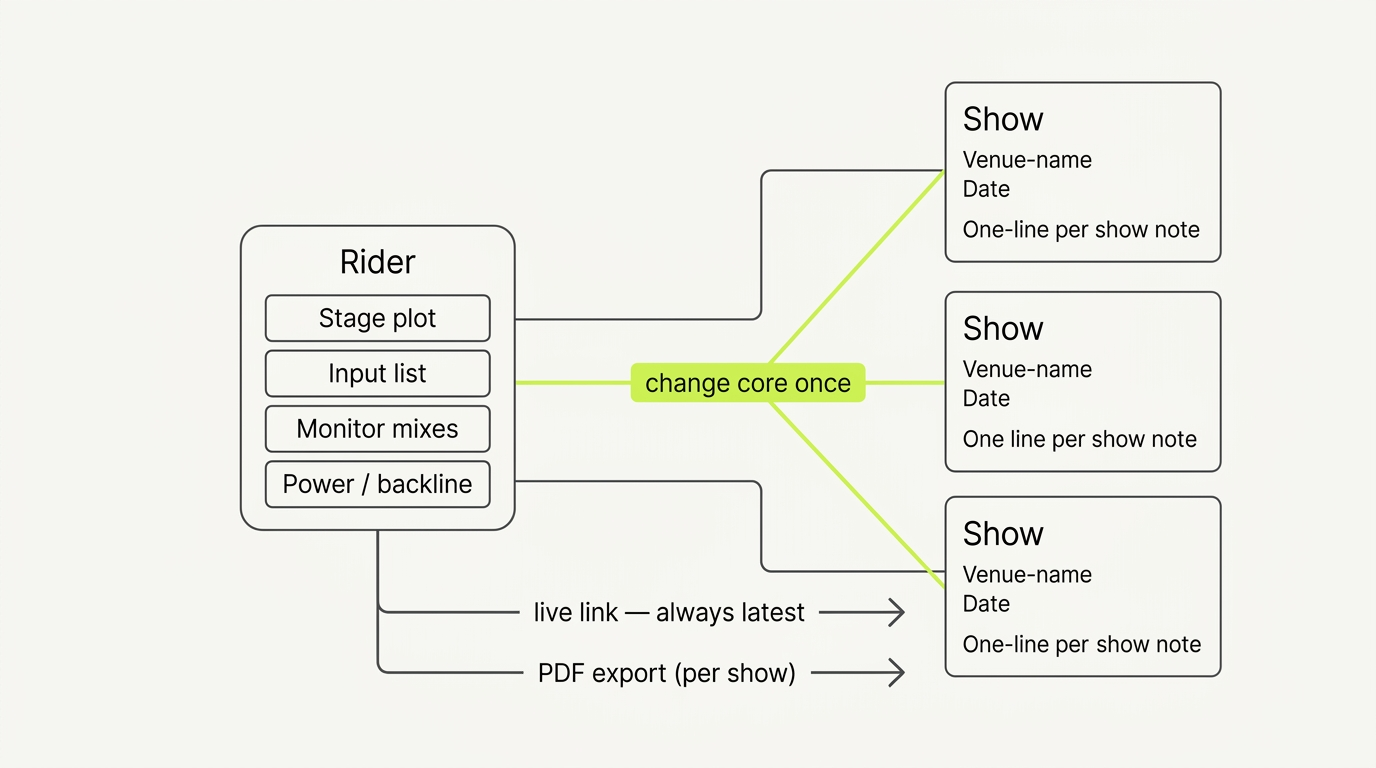
The diagram reads in three moves:
- One Rider holds the connected core — and because the stage plot, input list, monitor mixes, and power notes are one data model, a change to any of them stays in sync across all of them. (See How to Build an Input List / Patch Sheet.)
- Multiple Shows associate with that Rider — the same setup, applied to different dates and venues, with per-show notes layered on.
- One edit to the core propagates to every Show using the Rider, and the live link is always the latest version — no re-export per gig, no orphaned copies.
This is what makes the model genuinely reusable rather than just "copy from last time." You're not maintaining N documents. You're maintaining one and associating it with N shows.
(Verification note: the exact mechanism for attaching per-show notes — whether via a dedicated Show object, tags, or an associated-notes field — is a product detail; please verify against the current editor before referencing specific field names.)
How to reuse one rider, step by step
1. Build your Rider once, as the canonical setup
Build the full core Rider as if it described "the band," not "tonight": every performer, instrument, channel, monitor mix, and power note that's true across the tour. Label everything clearly — this is the version an engineer should be able to read on zero sleep. (How to Make a Stage Plot.)
2. Leave date and venue out of the core
Don't stamp tonight's date or this venue's name into the Rider's core fields. They belong at the show level. The Rider should read the same whether it's sent to a 200-cap club or a festival main stage — the differences are show-level details, not changes to who the band is on stage.
3. Associate each gig with the Rider
For each show on the tour, associate the gig with the Rider rather than duplicating it. Add the date, venue, and any per-show notes (local backline, festival patch, load-in contact) at the show level. The Rider stays one object; the shows layer their specifics on top.
alongside a side panel listing associated Shows: three rows, each with a venue name, date, and a short per-show-note line (e.g. "festival patch · house VENUE console", "local backline: no guitar cab", "load-in 16:00"). One Show row is highlighted (acid-green accent). Clean neutral UI, no clutter, strict grid.)
Fig. 1 — One Rider, associated with multiple Shows. The core is edited once; each show carries its own date, venue, and notes.
4. Edit the core once when something actually changes
When something about the band changes — a new song needs an extra input, the drummer swaps a snare mic, a vocalist moves to IEMs — edit the core Rider a single time. Every show associated with that Rider picks up the change. No need to open five files and apply the same edit five times (and miss one).
5. Share the live link — and export a PDF per show when needed
For each show, send the venue or engineer the live link. Because it always points at the current Rider, it's never stale. Export a PDF when a crew wants paper or a festival's network is unreliable — the PDF and the link render from the same source, so they don't drift. (See Sharing & Collaborating on a Rider: Link, PDF, Feedback.)
The live link is your source of truth; the dated PDF is your safety belt. You re-export a PDF when you want a frozen snapshot for a specific gig — you don't re-export just to "update" the document, because the link already reflects the latest save.
Keeping it current on the road
Reuse only works if the single version actually stays current. Two mechanisms make that real on tour:
The live link is always the latest version. Because every Show references one Rider, and the link always resolves to the current state of that Rider, the venue always sees your newest setup without you re-sending anything. No "did you get the updated one?" emails. No risk of a promoter patching from last week's PDF.
Async multi-editor collaboration keeps it maintained between gigs. Touring is a relay. The vocalist confirms positions after rehearsal; the engineer adjusts mic choices and patch after the first show; the TM adds backline notes before the next load-in. On Techrider.live, the Rider owner can invite up to 3 collaborators by email to open, edit, save, export, and inspect history on the same Rider — asynchronously, one editor at a time, on one canonical version. (Real-time simultaneous editing with live presence is on the roadmap, not shipping today.) The TM fixes something in the hotel, saves, and the next venue's link already reflects it. Full workflow: Collaborating on a Rider.
That handoff — combined with the history view, where every save is attributed to a signed-in editor — is what turns "reuse" from a hopeful idea into something you can trust on a 30-date run.
Templates vs a reusable rider
A common question: isn't a reusable rider just a template? Not quite.
- A template is a starting point. You copy it, fill it in, and the copy becomes a standalone document — which then drifts on its own. Templates solve the blank-canvas problem; they don't solve the per-gig-file trap.
- A reusable Rider is a living source. You don't copy it per show; you associate shows with it. Edits to the core propagate; the link stays current; history tracks who changed what.
Use a template to get to a first draft fast (grab our free stage plot template). Then graduate to a reusable Rider once you're playing more than one show — that's where the per-gig-file trap starts to bite.
FAQ
Can I reuse a tech rider for multiple shows? Yes — and you should. The core of a rider (people, instruments, channels, mixes, plot, power) is stable across a tour; only date, venue, and per-show details change. On Techrider.live, dates and venues are not hard-coded into the Rider's core config, so one Rider is associated with multiple shows without being duplicated. Edit the core once and every show benefits.
How do I manage stage plots on tour? Keep one canonical Rider and associate each gig with it, rather than copying a file per show. Layer per-show notes (local backline, festival patch, load-in time) at the show level. Share the live link — always the latest version — and export a PDF when a crew wants paper. This avoids the copy-rename-drift cycle that makes per-gig files unmanageable past a handful of dates.
Do I need a new stage plot for every gig? No. The stage plot itself (positions, mics, DIs, monitors) is part of the reusable core and rarely changes gig to gig. What changes is show-level — date, venue, local backline, patch. A Rider-first model keeps the plot once and associates it with each show, so you're not redrawing or recopying it.
How do I update a tech rider for a new venue? Edit only what actually changes. Venue-specific details (house console, provided backline, festival stage size) go in per-show notes attached to that gig, not baked into the core Rider. If a change is genuinely about the band (new instrument, new monitor setup), edit the core once and let it propagate to every associated show.
What's the best way to version a tech rider? Stop versioning by filename. Use a single connected Rider where the live link always resolves to the current version, and rely on a history view (each save attributed to a signed-in editor, restorable) for "what changed and when." For async edits on tour, invite up to 3 collaborators by email to edit, save, and inspect history on the same Rider. (Real-time co-editing is on the roadmap.) For the deeper versioning argument, see Why Your Tech Rider Should Be a Living Document.
What's next
- 🔄 Why Your Tech Rider Should Be a Living Document — versioning vs. static PDFs
- 🔗 Sharing & Collaborating on a Rider: Link, PDF, Feedback — live link, PDF, and feedback
- 👥 Collaborating on a Rider: Invite Your Engineer or TM — async multi-editor workflow
Further reading
- The "Necessary Evil" Of Paperwork: Rider & Stage Plot Clarity Can Really Pay Off — ProSoundWeb
- Guide to Tech Riders and Stage Plots for Shows and Tours — OffTrail Studios
- List of Apps and Software for Designing Stage Plots — SoundGirls.org
Last updated: 2026-07-07 · Reviewed by the Techrider.live team · Workflow tested against real touring productions.
Related guides
How to Make a Stage Plot for Your Band (5-Minute Guide)
A 5-step walkthrough to make a clean, engineer-readable stage plot for your band — set the stage, place performers, add gear and mics, then export a PDF and share link.
9 min readTutorialsFree Stage Plot Template (Download + How to Use)
A stage plot template is a pre-laid-out starting point for your band's stage map. Pick one of four shapes, customize performers and gear, and export a PDF.
9 min readTutorialsHow to Build an Input List / Patch Sheet (with Template)
A channel-by-channel table of every source on stage. Learn the input list columns, the drums-to-vocals ordering, 48V and DI rules, and how a patch sheet differs.
7 min read